

Sent money through Paytm, Google Pay or PhonePe UPI to the wrong person? Here are your options

You are paying a shopkeeper or sending money to a friend, enter a UPI ID or mobile number, and tap “Pay”. A moment later, you notice that one character was wrong or that you selected…

Sent money through Paytm, Google Pay or PhonePe UPI to the wrong person? Here are your options

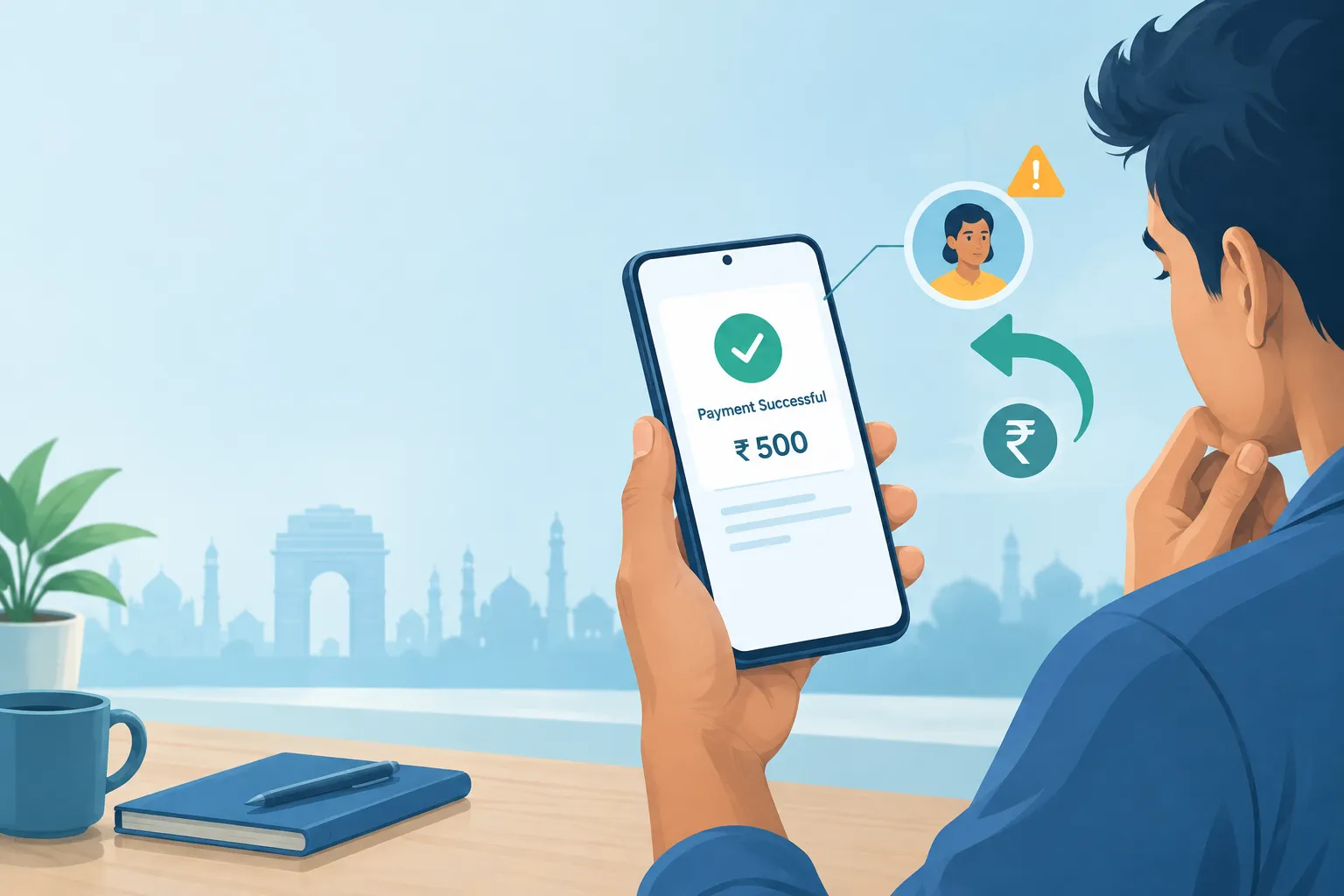
Person checking options after sending a UPI payment to the wrong recipient through Paytm, Google Pay or PhonePe

You are paying a shopkeeper or sending money to a friend, enter a UPI ID or mobile number, and tap “Pay”. A moment later, you notice that one character was wrong or that you selected another person with a similar name. The payment status already says “Successful”.

This is an easy mistake to make, but recovering the money may not be easy. A successfully completed UPI transfer generally cannot be cancelled by the sender. UPI payments are processed quickly, and your app cannot simply pull the money back from the recipient’s account.

You should still act immediately. Contact the recipient if possible, report the mistake through the payment app, and raise a complaint with your bank. The bank or app may help trace the transaction and contact the recipient’s bank, but recovery often depends on the recipient agreeing to return the money. There is no guarantee that a mistaken transfer will be reversed.

What to do immediately after a wrong UPI transfer
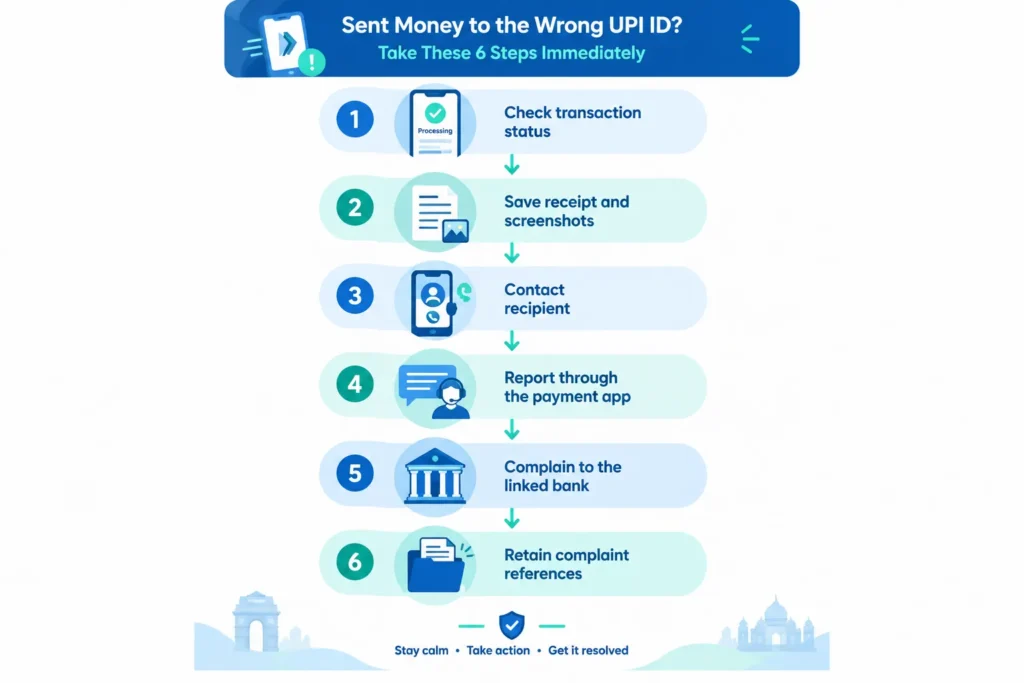
Flowchart showing the immediate steps after a wrong UPI transfer, from checking status to saving complaint references.

  1. Open the transaction and confirm its status. Check whether it is successful, pending or failed. Do not send another payment until you understand what happened.
  2. Save the transaction details. Take screenshots showing the UPI transaction ID, amount, date, time, recipient name or UPI ID, and status.
  3. Contact the recipient, if you can identify them. Politely explain the mistake and request a return transfer. Ask them to verify the credit independently in their bank account rather than relying only on your screenshot.
  4. Report the transaction in the UPI app. Use the help option attached to that specific payment. This creates a complaint record linked to the correct transaction.
  5. Contact your bank. Report the transfer as a mistaken beneficiary payment and ask the bank to initiate the applicable recovery or beneficiary-contact process.
  6. Keep every complaint number. Save emails, in-app ticket numbers, bank reference numbers and written responses for any later escalation.
Payment statusWhat it normally meansWhat you should do
SuccessfulThe beneficiary account has generally been credited.Request a refund and raise complaints with the app and bank. It normally cannot be cancelled unilaterally.
Pending or processingThe final result is not yet available.Do not pay again immediately. Check the app’s stated resolution period and report it if it remains unresolved.
Failed but debitedThe transaction failed, although your account was charged.Raise a failed-transaction complaint. This is different from sending money successfully to the wrong person.

Refund request versus transaction dispute

These two actions are related but not identical.

A refund request asks the recipient to return money that reached them through a valid, successful UPI instruction. If you authorised the payment but selected the wrong person, the transaction itself may have worked exactly as instructed. The recipient’s cooperation may therefore be needed.

A formal dispute asks the app, bank or payment system participant to investigate a problem. Examples include an unauthorised debit, a failed payment for which money was deducted, an incorrect transaction status, or a merchant payment where the service was not provided.

You can report a mistaken transfer as a complaint and ask for recovery assistance, but describing an authorised mistake as “fraud” does not make it an unauthorised transaction. Give the app and bank a truthful account of what happened.

You May Also Like:Growth vs IDCW Mutual Fund Options Explained

How to report a wrong payment in Google Pay

Menu names can change with app updates, but the complaint should be raised from the relevant transaction:

  1. Open Google Pay and find the payment in your transaction history.
  2. Select the transaction and confirm that the status is successful.
  3. Open the help or “Having issues?” option associated with the payment.
  4. Select the closest available issue and explain that the payment was sent to the wrong UPI ID or person.
  5. Submit the request and save the support or case reference.
  6. If the in-app options do not address the issue, use Google Pay’s Help and Support section to contact support.

Google Pay can record and route the complaint, but it cannot guarantee recovery from someone who received a completed payment.

How to report a wrong payment in PhonePe

  1. Open PhonePe and go to your transaction history.
  2. Tap the incorrect transfer.
  3. Choose the contact support, help or report-an-issue option shown for that transaction.
  4. Select the most relevant UPI payment category and describe the error clearly.
  5. Provide any requested information without sharing your UPI PIN, card PIN, password or one-time password.
  6. Note the complaint reference and monitor the ticket in the app’s support section.

Use only support options inside the official app or contact details published by PhonePe. Search-engine advertisements and unofficial “customer care” numbers are frequently used by scammers.

How to report a wrong payment in Paytm

  1. Open Paytm and locate the payment under Balance & History or the relevant transaction-history section.
  2. Select the UPI transaction.
  3. Tap the help, support or “Need Help?” option available on the transaction page.
  4. Choose the closest issue type and state that you authorised the payment but selected the wrong recipient.
  5. Submit the complaint and retain the ticket number and any response.
  6. If necessary, use Paytm’s official in-app Help & Support section for further assistance.

Do not pay anyone who claims that a special fee, UPI PIN or screen-sharing app is required to recover the transfer.

Contact the bank linked to your UPI account

The payment app is only one participant in a UPI transfer. You should also approach the bank account from which the money was debited.

  1. Contact the bank through its official mobile app, website, branch or verified customer-care channel.
  2. Explain that this was a successful but mistaken UPI transfer. Do not incorrectly report it as unauthorised if you approved it yourself.
  3. Give the UPI transaction ID or UTR/reference number, amount, date, recipient details displayed in the app and your account information.
  4. Ask the bank to register a written complaint and initiate the applicable recovery process with the beneficiary bank.
  5. Request a complaint number and the bank’s written response.
  6. If frontline support does not resolve it, escalate through the bank’s published grievance-redressal hierarchy, including its nodal or principal nodal officer where applicable.
You May Also Like:Fundamental Analysis vs Technical Analysis: Key Differences Explained

Your bank may contact the beneficiary bank, which may in turn approach its customer. Banks generally cannot simply debit a recipient’s account merely because the sender says the payment was a mistake. Consent, verification or further legal process may be required, depending on the circumstances.

Privacy rules may also prevent the bank from disclosing the recipient’s personal or account information directly to you.

How the NPCI UPI complaint process works
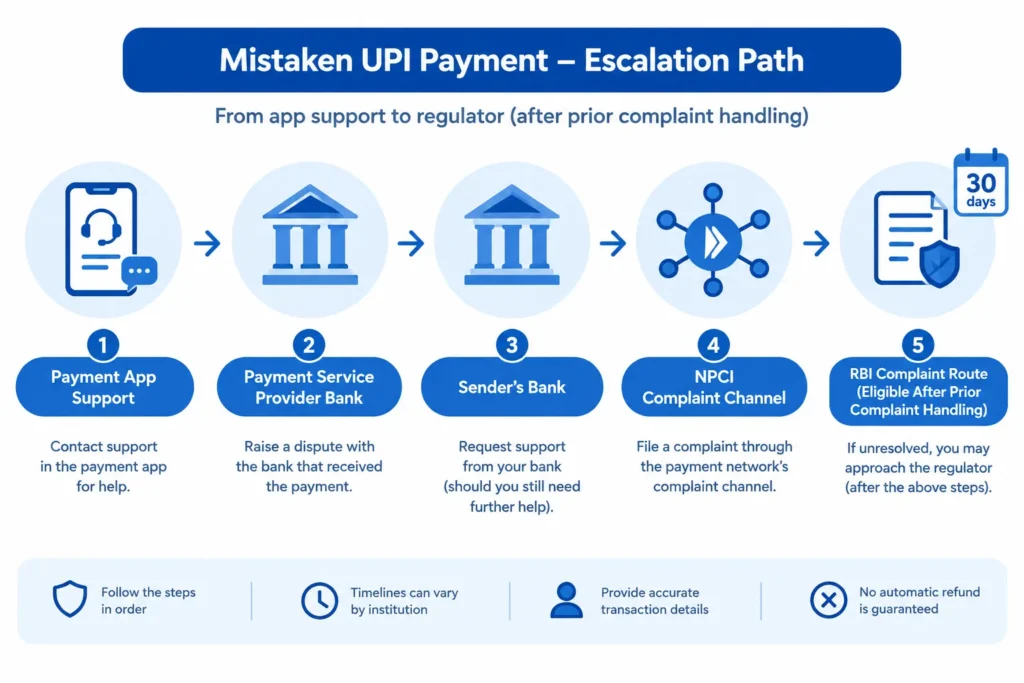
Escalation path for a UPI complaint from the payment app and banks to NPCI and, where eligible, the RBI complaint route.

NPCI operates the UPI platform and provides a dispute-redressal mechanism. For a UPI complaint, the normal escalation path begins with the app used to make the payment.

  1. Raise the complaint with the UPI app or third-party app provider through which you initiated the transaction.
  2. If it remains unresolved, escalate it to the payment service provider bank associated with the app.
  3. You may then approach the bank where you hold the debited account.
  4. If the issue is still unresolved after the appropriate earlier levels, use NPCI’s official complaint or dispute-redressal facility and provide the earlier complaint references.
  5. If there is an eligible unresolved service complaint against an RBI-regulated entity, consider the RBI complaint route after meeting its conditions.

On NPCI’s official website, use the UPI dispute or complaint section and complete the form with the transaction and participant details requested. Select the issue that most accurately describes your case. Keep the acknowledgement generated after submission.

NPCI escalation does not guarantee a refund for a transfer that you knowingly authorised but addressed incorrectly. Its role in a complaint is different from compelling an unwilling recipient to return money.

When can you complain to the RBI?

The Reserve Bank of India’s Integrated Ombudsman Scheme provides a cost-free complaint mechanism for eligible complaints involving a deficiency in service by covered RBI-regulated entities. It is not a first step and is not an automatic refund mechanism for every wrong UPI transfer.

Eligibility before filing

  • You must first make a written complaint to the bank or other regulated entity concerned.
  • You may approach the RBI if the entity rejects the complaint, gives a response you are not satisfied with, or does not respond within 30 days after receiving it.
  • The complaint must fall within the scope of the Integrated Ombudsman Scheme and must not be excluded for reasons specified under that scheme.
You May Also Like:What Are Sensex and Nifty 50? A Beginner’s Guide

Time limit

If the regulated entity sent a reply, the RBI complaint should generally be filed within one year of that reply. If no reply was received, it should generally be filed within one year and 30 days from the date you first complained to the regulated entity.

File through the RBI Complaint Management System, by the other official methods permitted by RBI, or seek guidance from RBI’s official contact centre. Do not use the discontinued Banking Ombudsman website mentioned in older articles.

The RBI route may be relevant if your complaint concerns an eligible service failure—for example, inadequate handling of a complaint by a covered regulated entity. The mere fact that you entered the wrong UPI ID does not necessarily establish a deficiency in banking service or make the complaint maintainable.

What if the recipient refuses to return the money?

Remain calm and keep communication factual. Do not threaten the recipient or publish their displayed name, phone number or UPI ID online.

  1. Send a clear written request identifying the amount, date and transaction reference.
  2. Ask your bank to formally contact the beneficiary bank and record the refusal or non-response.
  3. Preserve messages, call records, transaction screenshots and complaint responses.
  4. Escalate through the app, banks and NPCI where appropriate.
  5. If the amount justifies further action, consider obtaining advice from a qualified lawyer about available civil or other legal remedies.

Do not try to recover the money by making another “collect” request that could confuse the situation. Never share your UPI PIN. A PIN is used to authorise money leaving your account, not to receive a refund.

Fraudulent or unauthorised UPI transactions

An unauthorised transaction is different from a transfer you personally approved to the wrong person. Examples include a payment made after your phone or credentials were compromised, or a debit you did not authorise.

If you suspect fraud or see an unauthorised UPI debit:

  1. Call 1930 immediately to report financial cyber fraud in India. Speed matters because authorities and financial institutions may have a better chance of acting before funds are moved onward.
  2. Submit the complaint on the official National Cyber Crime Reporting Portal and retain the acknowledgement.
  3. Notify your bank immediately through an official channel and ask it to block or secure the affected account or UPI access as appropriate.
  4. Report the transaction to the UPI app and change relevant passwords or device access credentials.
  5. If your phone or SIM is lost or compromised, contact your mobile operator and bank without delay.
  6. Preserve messages, phone numbers, payment requests, URLs, screenshots and call details. Do not delete evidence.

Do not wait for the app’s ordinary support process before reporting active cyber fraud. However, do not call 1930 merely because you mistyped a UPI ID unless deception, account compromise or another genuine fraud element is involved.

Complaint documents and details checklist

  • UPI transaction ID, UTR or bank reference number
  • Amount, date and exact time of payment
  • Transaction status shown in the app
  • Sender’s UPI ID and linked bank name
  • Recipient’s displayed name, UPI ID or masked details shown in the receipt
  • Screenshots or a downloaded transaction receipt
  • Short written explanation of how the mistake occurred
  • App support ticket and earlier complaint references
  • Bank complaint number and written response
  • Relevant communication with the recipient
  • Cybercrime acknowledgement, if the transaction was fraudulent or unauthorised
You May Also Like:How to Compare Mutual Funds: Returns, Risk, Costs and Consistency

Share documents only through verified official channels. No genuine support representative needs your UPI PIN, ATM PIN, card CVV, password or OTP to register a complaint.

How to avoid sending UPI money to the wrong person

  • Check the recipient name displayed by the app before entering your UPI PIN.
  • Read the complete UPI ID; do not rely only on a familiar-looking name or profile picture.
  • For a new recipient or a large transfer, consider sending a small test amount first and confirm receipt.
  • Ask the recipient to send their UPI ID in writing instead of noting it from a phone call.
  • At shops, confirm the merchant name after scanning the QR code.
  • Remove outdated beneficiaries and avoid choosing recipients hurriedly from recent contacts.
  • Remember that entering a UPI PIN authorises a debit. You do not enter it to receive money.
  • Never allow an unknown caller to control your screen or install a remote-access app.

Frequently asked questions

Can I cancel a successful UPI payment?

Generally, no. Once a UPI payment is completed successfully, the sender usually cannot cancel it from the app. You can request a return and raise a complaint, but recovery is not guaranteed.

Will Google Pay, PhonePe or Paytm refund a wrong transfer?

The app can register the complaint and help route it through the payment system. It ordinarily cannot promise a refund where the payment was correctly processed to the UPI ID you selected.

Can my bank reverse the payment immediately?

Not necessarily. The bank may initiate a recovery request and contact the beneficiary bank, but it generally cannot unilaterally take money from another customer’s account solely on your request.

What if I sent money to a mobile number that no longer belongs to my contact?

Report it in the app and to your bank immediately. Do not assume that a saved contact name proves who received the funds; use the UPI ID and transaction reference in your complaint.

Should I share a screenshot with the recipient?

You may share enough transaction information to help them identify the credit, but mask unrelated account details. Never share your UPI PIN, OTP, card details or banking password.

Can I complain to RBI immediately?

No. You must normally complain to the regulated entity first. RBI escalation is generally available only after an unsatisfactory response or no response within 30 days, and the complaint must otherwise be eligible under the Integrated Ombudsman Scheme.

Should I call 1930 for a mistaken transfer?

Call 1930 when the transaction involves financial cyber fraud or was unauthorised. A simple typing or recipient-selection mistake is ordinarily handled through the app, banks and applicable UPI complaint process.

Conclusion

If you send a UPI payment to the wrong person, act quickly but keep your expectations realistic. Save the transaction proof, ask the recipient to return the money, report the payment in Google Pay, PhonePe or Paytm, and lodge a written complaint with your bank. Escalate through the appropriate UPI and regulatory channels only after completing the earlier steps.

A formal complaint can help trace and document the payment, but a successful transfer that you authorised generally cannot be cancelled on demand. Checking the recipient name and UPI ID before entering your PIN remains the most effective protection.


Share this article
KEEP READING

Related Articles

View all →

Sent money through Paytm, Google Pay or PhonePe UPI to the wrong person? Here are your options

Person checking options after sending a UPI payment to the wrong recipient through Paytm, Google Pay or PhonePe

You are paying a shopkeeper or sending money to a friend, enter a UPI ID or mobile number, and tap “Pay”. A moment later, you notice that one character was wrong or that you selected another person with a similar name. The payment status already says “Successful”.

This is an easy mistake to make, but recovering the money may not be easy. A successfully completed UPI transfer generally cannot be cancelled by the sender. UPI payments are processed quickly, and your app cannot simply pull the money back from the recipient’s account.

You should still act immediately. Contact the recipient if possible, report the mistake through the payment app, and raise a complaint with your bank. The bank or app may help trace the transaction and contact the recipient’s bank, but recovery often depends on the recipient agreeing to return the money. There is no guarantee that a mistaken transfer will be reversed.

What to do immediately after a wrong UPI transfer

Flowchart showing the immediate steps after a wrong UPI transfer, from checking status to saving complaint references.

  1. Open the transaction and confirm its status. Check whether it is successful, pending or failed. Do not send another payment until you understand what happened.
  2. Save the transaction details. Take screenshots showing the UPI transaction ID, amount, date, time, recipient name or UPI ID, and status.
  3. Contact the recipient, if you can identify them. Politely explain the mistake and request a return transfer. Ask them to verify the credit independently in their bank account rather than relying only on your screenshot.
  4. Report the transaction in the UPI app. Use the help option attached to that specific payment. This creates a complaint record linked to the correct transaction.
  5. Contact your bank. Report the transfer as a mistaken beneficiary payment and ask the bank to initiate the applicable recovery or beneficiary-contact process.
  6. Keep every complaint number. Save emails, in-app ticket numbers, bank reference numbers and written responses for any later escalation.
Payment statusWhat it normally meansWhat you should do
SuccessfulThe beneficiary account has generally been credited.Request a refund and raise complaints with the app and bank. It normally cannot be cancelled unilaterally.
Pending or processingThe final result is not yet available.Do not pay again immediately. Check the app’s stated resolution period and report it if it remains unresolved.
Failed but debitedThe transaction failed, although your account was charged.Raise a failed-transaction complaint. This is different from sending money successfully to the wrong person.

Refund request versus transaction dispute

These two actions are related but not identical.

A refund request asks the recipient to return money that reached them through a valid, successful UPI instruction. If you authorised the payment but selected the wrong person, the transaction itself may have worked exactly as instructed. The recipient’s cooperation may therefore be needed.

A formal dispute asks the app, bank or payment system participant to investigate a problem. Examples include an unauthorised debit, a failed payment for which money was deducted, an incorrect transaction status, or a merchant payment where the service was not provided.

You can report a mistaken transfer as a complaint and ask for recovery assistance, but describing an authorised mistake as “fraud” does not make it an unauthorised transaction. Give the app and bank a truthful account of what happened.

How to report a wrong payment in Google Pay

Menu names can change with app updates, but the complaint should be raised from the relevant transaction:

  1. Open Google Pay and find the payment in your transaction history.
  2. Select the transaction and confirm that the status is successful.
  3. Open the help or “Having issues?” option associated with the payment.
  4. Select the closest available issue and explain that the payment was sent to the wrong UPI ID or person.
  5. Submit the request and save the support or case reference.
  6. If the in-app options do not address the issue, use Google Pay’s Help and Support section to contact support.

Google Pay can record and route the complaint, but it cannot guarantee recovery from someone who received a completed payment.

How to report a wrong payment in PhonePe

  1. Open PhonePe and go to your transaction history.
  2. Tap the incorrect transfer.
  3. Choose the contact support, help or report-an-issue option shown for that transaction.
  4. Select the most relevant UPI payment category and describe the error clearly.
  5. Provide any requested information without sharing your UPI PIN, card PIN, password or one-time password.
  6. Note the complaint reference and monitor the ticket in the app’s support section.

Use only support options inside the official app or contact details published by PhonePe. Search-engine advertisements and unofficial “customer care” numbers are frequently used by scammers.

How to report a wrong payment in Paytm

  1. Open Paytm and locate the payment under Balance & History or the relevant transaction-history section.
  2. Select the UPI transaction.
  3. Tap the help, support or “Need Help?” option available on the transaction page.
  4. Choose the closest issue type and state that you authorised the payment but selected the wrong recipient.
  5. Submit the complaint and retain the ticket number and any response.
  6. If necessary, use Paytm’s official in-app Help & Support section for further assistance.

Do not pay anyone who claims that a special fee, UPI PIN or screen-sharing app is required to recover the transfer.

Contact the bank linked to your UPI account

The payment app is only one participant in a UPI transfer. You should also approach the bank account from which the money was debited.

  1. Contact the bank through its official mobile app, website, branch or verified customer-care channel.
  2. Explain that this was a successful but mistaken UPI transfer. Do not incorrectly report it as unauthorised if you approved it yourself.
  3. Give the UPI transaction ID or UTR/reference number, amount, date, recipient details displayed in the app and your account information.
  4. Ask the bank to register a written complaint and initiate the applicable recovery process with the beneficiary bank.
  5. Request a complaint number and the bank’s written response.
  6. If frontline support does not resolve it, escalate through the bank’s published grievance-redressal hierarchy, including its nodal or principal nodal officer where applicable.

Your bank may contact the beneficiary bank, which may in turn approach its customer. Banks generally cannot simply debit a recipient’s account merely because the sender says the payment was a mistake. Consent, verification or further legal process may be required, depending on the circumstances.

Privacy rules may also prevent the bank from disclosing the recipient’s personal or account information directly to you.

How the NPCI UPI complaint process works

Escalation path for a UPI complaint from the payment app and banks to NPCI and, where eligible, the RBI complaint route.

NPCI operates the UPI platform and provides a dispute-redressal mechanism. For a UPI complaint, the normal escalation path begins with the app used to make the payment.

  1. Raise the complaint with the UPI app or third-party app provider through which you initiated the transaction.
  2. If it remains unresolved, escalate it to the payment service provider bank associated with the app.
  3. You may then approach the bank where you hold the debited account.
  4. If the issue is still unresolved after the appropriate earlier levels, use NPCI’s official complaint or dispute-redressal facility and provide the earlier complaint references.
  5. If there is an eligible unresolved service complaint against an RBI-regulated entity, consider the RBI complaint route after meeting its conditions.

On NPCI’s official website, use the UPI dispute or complaint section and complete the form with the transaction and participant details requested. Select the issue that most accurately describes your case. Keep the acknowledgement generated after submission.

NPCI escalation does not guarantee a refund for a transfer that you knowingly authorised but addressed incorrectly. Its role in a complaint is different from compelling an unwilling recipient to return money.

When can you complain to the RBI?

The Reserve Bank of India’s Integrated Ombudsman Scheme provides a cost-free complaint mechanism for eligible complaints involving a deficiency in service by covered RBI-regulated entities. It is not a first step and is not an automatic refund mechanism for every wrong UPI transfer.

Eligibility before filing

  • You must first make a written complaint to the bank or other regulated entity concerned.
  • You may approach the RBI if the entity rejects the complaint, gives a response you are not satisfied with, or does not respond within 30 days after receiving it.
  • The complaint must fall within the scope of the Integrated Ombudsman Scheme and must not be excluded for reasons specified under that scheme.

Time limit

If the regulated entity sent a reply, the RBI complaint should generally be filed within one year of that reply. If no reply was received, it should generally be filed within one year and 30 days from the date you first complained to the regulated entity.

File through the RBI Complaint Management System, by the other official methods permitted by RBI, or seek guidance from RBI’s official contact centre. Do not use the discontinued Banking Ombudsman website mentioned in older articles.

The RBI route may be relevant if your complaint concerns an eligible service failure—for example, inadequate handling of a complaint by a covered regulated entity. The mere fact that you entered the wrong UPI ID does not necessarily establish a deficiency in banking service or make the complaint maintainable.

What if the recipient refuses to return the money?

Remain calm and keep communication factual. Do not threaten the recipient or publish their displayed name, phone number or UPI ID online.

  1. Send a clear written request identifying the amount, date and transaction reference.
  2. Ask your bank to formally contact the beneficiary bank and record the refusal or non-response.
  3. Preserve messages, call records, transaction screenshots and complaint responses.
  4. Escalate through the app, banks and NPCI where appropriate.
  5. If the amount justifies further action, consider obtaining advice from a qualified lawyer about available civil or other legal remedies.

Do not try to recover the money by making another “collect” request that could confuse the situation. Never share your UPI PIN. A PIN is used to authorise money leaving your account, not to receive a refund.

Fraudulent or unauthorised UPI transactions

An unauthorised transaction is different from a transfer you personally approved to the wrong person. Examples include a payment made after your phone or credentials were compromised, or a debit you did not authorise.

If you suspect fraud or see an unauthorised UPI debit:

  1. Call 1930 immediately to report financial cyber fraud in India. Speed matters because authorities and financial institutions may have a better chance of acting before funds are moved onward.
  2. Submit the complaint on the official National Cyber Crime Reporting Portal and retain the acknowledgement.
  3. Notify your bank immediately through an official channel and ask it to block or secure the affected account or UPI access as appropriate.
  4. Report the transaction to the UPI app and change relevant passwords or device access credentials.
  5. If your phone or SIM is lost or compromised, contact your mobile operator and bank without delay.
  6. Preserve messages, phone numbers, payment requests, URLs, screenshots and call details. Do not delete evidence.

Do not wait for the app’s ordinary support process before reporting active cyber fraud. However, do not call 1930 merely because you mistyped a UPI ID unless deception, account compromise or another genuine fraud element is involved.

Complaint documents and details checklist

  • UPI transaction ID, UTR or bank reference number
  • Amount, date and exact time of payment
  • Transaction status shown in the app
  • Sender’s UPI ID and linked bank name
  • Recipient’s displayed name, UPI ID or masked details shown in the receipt
  • Screenshots or a downloaded transaction receipt
  • Short written explanation of how the mistake occurred
  • App support ticket and earlier complaint references
  • Bank complaint number and written response
  • Relevant communication with the recipient
  • Cybercrime acknowledgement, if the transaction was fraudulent or unauthorised

Share documents only through verified official channels. No genuine support representative needs your UPI PIN, ATM PIN, card CVV, password or OTP to register a complaint.

How to avoid sending UPI money to the wrong person

  • Check the recipient name displayed by the app before entering your UPI PIN.
  • Read the complete UPI ID; do not rely only on a familiar-looking name or profile picture.
  • For a new recipient or a large transfer, consider sending a small test amount first and confirm receipt.
  • Ask the recipient to send their UPI ID in writing instead of noting it from a phone call.
  • At shops, confirm the merchant name after scanning the QR code.
  • Remove outdated beneficiaries and avoid choosing recipients hurriedly from recent contacts.
  • Remember that entering a UPI PIN authorises a debit. You do not enter it to receive money.
  • Never allow an unknown caller to control your screen or install a remote-access app.

Frequently asked questions

Can I cancel a successful UPI payment?

Generally, no. Once a UPI payment is completed successfully, the sender usually cannot cancel it from the app. You can request a return and raise a complaint, but recovery is not guaranteed.

Will Google Pay, PhonePe or Paytm refund a wrong transfer?

The app can register the complaint and help route it through the payment system. It ordinarily cannot promise a refund where the payment was correctly processed to the UPI ID you selected.

Can my bank reverse the payment immediately?

Not necessarily. The bank may initiate a recovery request and contact the beneficiary bank, but it generally cannot unilaterally take money from another customer’s account solely on your request.

What if I sent money to a mobile number that no longer belongs to my contact?

Report it in the app and to your bank immediately. Do not assume that a saved contact name proves who received the funds; use the UPI ID and transaction reference in your complaint.

Should I share a screenshot with the recipient?

You may share enough transaction information to help them identify the credit, but mask unrelated account details. Never share your UPI PIN, OTP, card details or banking password.

Can I complain to RBI immediately?

No. You must normally complain to the regulated entity first. RBI escalation is generally available only after an unsatisfactory response or no response within 30 days, and the complaint must otherwise be eligible under the Integrated Ombudsman Scheme.

Should I call 1930 for a mistaken transfer?

Call 1930 when the transaction involves financial cyber fraud or was unauthorised. A simple typing or recipient-selection mistake is ordinarily handled through the app, banks and applicable UPI complaint process.

Conclusion

If you send a UPI payment to the wrong person, act quickly but keep your expectations realistic. Save the transaction proof, ask the recipient to return the money, report the payment in Google Pay, PhonePe or Paytm, and lodge a written complaint with your bank. Escalate through the appropriate UPI and regulatory channels only after completing the earlier steps.

A formal complaint can help trace and document the payment, but a successful transfer that you authorised generally cannot be cancelled on demand. Checking the recipient name and UPI ID before entering your PIN remains the most effective protection.
Contact RegularStation: klassicweb@gmail.com | +91 9376859993