

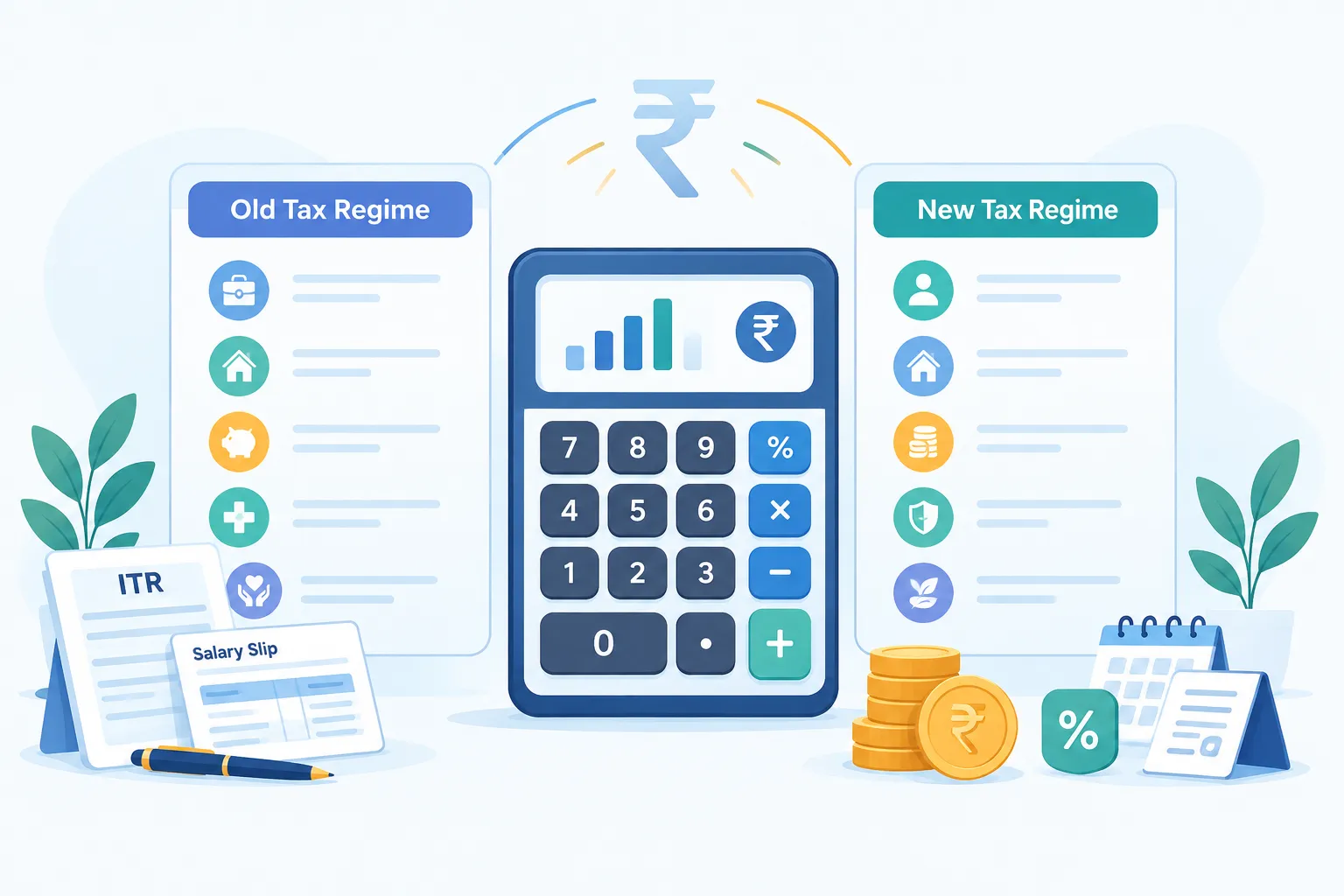
Income Tax Calculator – Old vs New Tax Regime (India)

Estimate your income tax for Tax Year 2026–27, compare the Old and New Tax Regimes, and understand how income, deductions, rebate, surcharge and cess affect your tax liability.

Income Tax Calculator – Old vs New Tax Regime (India)

An income tax calculator helps you estimate your tax under the Old Tax Regime and the New Tax Regime. Enter your salary or pension, other taxable income, eligible deductions, exemptions and basic taxpayer details. The calculator can then show an estimated liability under each available regime so that you can compare the results before making a tax decision.

For Tax Year 2026–27, use the rules under the Income-tax Act, 2025. The New Regime is the default regime, but your ability to choose or opt out depends on your income type, eligibility and the applicable tax rules.

Introduction

Income tax can feel complicated because your taxable income is not always the same as the amount credited to your bank account. Salary components, pension, interest, rental income, exemptions and deductions can all affect the final calculation.

This income tax calculator is intended for salaried employees, pensioners and other individual taxpayers in India. It provides an estimate based on the information you enter. It can also help you compare the Old and New Tax Regimes without doing every calculation manually.

Tax Year 2026–27 means the period from 1 April 2026 to 31 March 2027 under the Income-tax Act, 2025. Do not confuse this with Assessment Year 2026–27 under the previous Act. Assessment Year 2026–27 generally relates to income earned during Financial Year 2025–26. Choosing the correct year is important because tax slabs, deductions, rebates and other rules can differ.

TAX PLANNING · INDIA

Income Tax Calculator – Old vs New Regime

Compare your estimated income tax for Tax Year 2026–27. Enter annual income and eligible deductions below.

1. Your profile

2. Annual income

3. Old Regime exemptions and deductions

4. New Regime deduction

5. Tax already paid

Results update automatically
YOUR COMPARISON

Estimated tax liability

Tax Year 2026–27

Old Tax Regime

₹0Estimated tax including cess
Taxable income
₹0
Effective tax rate
0%
Balance after tax paid
₹0

New Tax Regime

₹0Estimated tax including cess
Taxable income
₹0
Effective tax rate
0%
Balance after tax paid
₹0
Estimated tax difference₹0

Calculation breakdown

ParticularsOldNew
Gross total income₹0₹0
Standard deduction₹0₹0
Other exemptions / deductions₹0₹0
Taxable income₹0₹0
Tax after rebate₹0₹0
Surcharge₹0₹0
Cess₹0₹0
Total tax₹0₹0
This version estimates normal-rate income and selected deductions only. Special-rate income, complex capital gains, business income, detailed house-property computations, foreign income and loss set-off are not modelled.

Disclaimer: This calculator provides an indicative estimate for education and planning, not tax, legal or filing advice. Verify eligibility, deductions and final liability with the Income Tax Department or a qualified tax professional before making decisions or filing a return.

You May Also Like:What Are Mutual Funds? How They Work in India

Use the Income Tax Calculator for Tax Year 2026–27

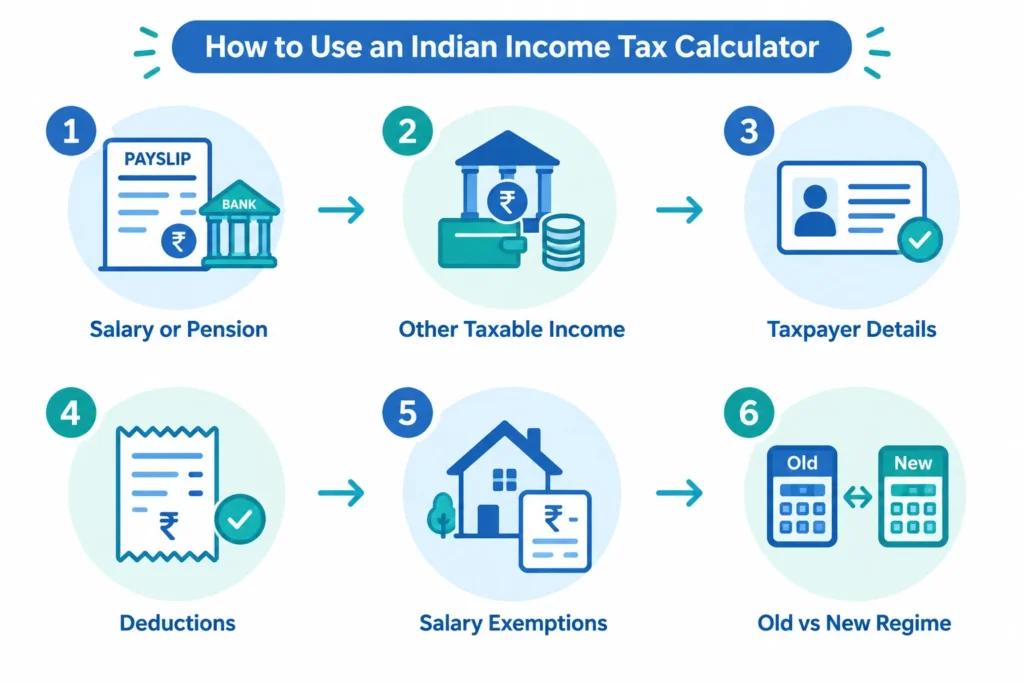
Flowchart showing the inputs needed to compare Indian income tax regimes

Start by collecting your expected income and deduction details for the full tax year. If you are calculating tax before the year ends, use reasonable estimates based on your salary structure, pension statements, bank records and expected investments. You can update the calculation later if your income changes.

The result is an estimate, not an income tax return or an official tax demand. Your final liability can change because of rounding, special-rate income, relief, residential status, documentation or later changes in your income.

Step 1: Enter your salary or pension income

Enter your salary or taxable pension for the entire tax year, not only the monthly amount received in hand. Your take-home pay is usually lower than your gross salary because the employer may deduct provident fund contributions, professional tax, tax deducted at source and other amounts.

For salary income, refer to your salary structure, payslips or projected Form 16 details. Include taxable components such as basic salary, taxable allowances, bonus, commission and taxable perquisites where relevant.

For example, suppose an employee receives basic salary, house rent allowance, a performance bonus and a taxable employer-provided benefit. The starting salary figure should include all taxable salary components. Any eligible exemption should be entered separately rather than reducing the salary figure without an explanation.

If you receive a regular pension from a former employer, it is generally treated as salary income. Family pension is treated differently and should normally be entered under the appropriate other-income category rather than as salary. Use the classification that applies to your particular receipt.

Step 2: Add other taxable income

Include taxable income that is not part of your salary or regular pension. Common Indian examples include:

  • Interest from savings accounts, fixed deposits, recurring deposits and bonds.
  • Rental income from a house property after applying the relevant tax rules.
  • Freelance, consultancy or professional income.
  • Business income, if the calculator supports your circumstances.
  • Dividends and other taxable investment income.
  • Family pension and taxable income from other sources.

Do not leave out income merely because tax has already been deducted at source. TDS is generally tax paid on your behalf; it does not automatically make the underlying income tax-free.

Some income, including certain capital gains, lottery winnings and specified investment income, may be taxed at special rates. If you have such income, enter it in the relevant field rather than combining it with ordinary salary income. A simple calculator result may need additional review where special-rate income or complex transactions are involved.

Step 3: Select the correct taxpayer details

Enter the personal details requested by the calculator carefully. These may affect which rules are applied to the estimate.

  • Tax year: Select Tax Year 2026–27 for income earned from 1 April 2026 to 31 March 2027.
  • Taxpayer type: Choose the appropriate individual category, such as salaried employee or pensioner.
  • Age or senior-citizen category: Enter the applicable information if requested.
  • Residential status: Select the correct status because some tax rules depend on whether you are resident or non-resident.
  • Nature of income: Indicate whether you have salary, pension, business, professional or other income where required.

Residential status for tax purposes is based on legal conditions and is not determined only by citizenship. If you moved into or out of India during the year, obtain appropriate advice before relying on a basic estimate.

Step 4: Enter deductions separately

Deductions reduce taxable income when the selected regime permits them and you satisfy the relevant conditions. Enter only amounts that you expect to be eligible to claim and can support with the required records.

Depending on the applicable law and tax regime, the calculator may ask for items such as eligible investments, specified insurance payments, qualifying retirement contributions, health insurance premiums, permitted donations, education-loan interest or other deductions.

Do not enter the same amount twice. For example, an eligible contribution should not be included once under an investment deduction and again under another retirement field unless the law specifically permits separate treatment.

The Old and New Tax Regimes do not allow the same set of deductions. A deduction entered into the calculator should affect a regime only when it is available under that regime. Keep your figures ready even if you are unsure which regime will be better, as the purpose of the comparison is to test both sets of rules.

Step 5: Add relevant salary exemptions

Enter eligible exemptions in the fields provided instead of subtracting them casually from gross income. Salary exemptions may depend on the allowance received, actual spending, place of residence and supporting documents.

House rent allowance is a common example under the regime where the exemption is available. The exempt amount is not necessarily equal to the full HRA shown on a payslip. It must be calculated under the applicable conditions using details such as salary, HRA received, rent paid and the city category.

Other salary-related exemptions may also have specific limits and conditions. Enter only the eligible amount. If an allowance is fully taxable under the selected regime, do not treat it as exempt merely because it appears separately in your salary structure.

You May Also Like:Home Loan Balance Transfer in India: Benefits, Charges and When to Switch

Step 6: Compare the Old and New Tax Regimes

The New Regime is the default tax regime, subject to eligibility and the applicable opt-out rules. This does not mean that it will always produce the lower tax estimate for every person. The outcome depends on your income mix and the deductions or exemptions available to you.

Taxpayers without business or professional income may generally have different regime-selection rules from taxpayers who earn business or professional income. In particular, opting out of the default regime and changing the choice in a later year can be subject to additional conditions for people with business or professional income.

Compare the complete estimated tax under both regimes rather than comparing only the slab rates. The calculation may also need to consider any available rebate, surcharge, health and education cess, special-rate income and other applicable provisions.

Finally, review every entry and select the option to calculate and compare your estimated tax. Use the result as a planning aid, not as a promise of tax savings. Before filing your return or making a regime choice, confirm the figures against your tax documents and the rules applicable to your circumstances.

Old vs New Tax Regime: Slabs, Deductions and Tax Calculation

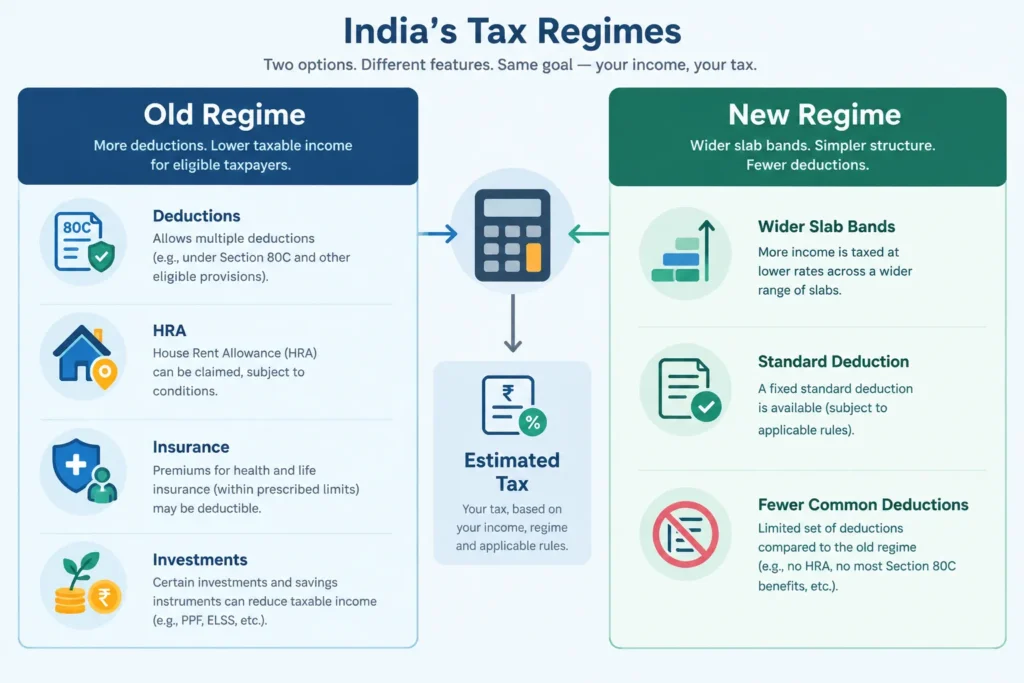
Visual comparison of deductions and tax structure under India's Old and New Tax Regimes

An income tax calculator compares your estimated tax under the old and new tax regimes. It first works out taxable income under each regime, applies the relevant slab rates, and then adds surcharge and Health and Education Cess where applicable.

In this section, “Tax Year 2026–27” refers to Assessment Year 2026–27, covering income earned during Financial Year 2025–26. The tables below apply to individuals. Special tax rates may apply to income such as certain capital gains, lottery winnings and some virtual digital asset income.

New Tax Regime Slabs for Assessment Year 2026–27

The new tax regime is the default regime. It offers wider tax slabs but generally does not allow many common exemptions and deductions.

Taxable incomeIncome tax rate
Up to ₹4,00,000Nil
₹4,00,001 to ₹8,00,0005%
₹8,00,001 to ₹12,00,00010%
₹12,00,001 to ₹16,00,00015%
₹16,00,001 to ₹20,00,00020%
₹20,00,001 to ₹24,00,00025%
Above ₹24,00,00030%

A salaried person can generally claim a standard deduction of up to ₹75,000 under the new regime. Therefore, a resident salaried individual with salary income of up to ₹12,75,000 may have no tax on normal slab-rate income, subject to rebate eligibility and other applicable rules.

This does not mean that every person earning ₹12,75,000 automatically pays no tax. The result can change if the person has income taxed at special rates, is not eligible for the rebate, or has income from sources other than salary.

Old Tax Regime Slabs for Assessment Year 2026–27

The old regime has fewer slabs and higher rates at relatively lower income levels. However, it allows several exemptions and deductions, subject to their conditions.

Taxable incomeIncome tax rate
Up to ₹2,50,000Nil
₹2,50,001 to ₹5,00,0005%
₹5,00,001 to ₹10,00,00020%
Above ₹10,00,00030%

These old-regime slabs apply to individuals below 60 years of age. Resident senior citizens aged 60 or more but below 80 have a higher basic exemption limit of ₹3,00,000. Resident super senior citizens aged 80 or more have a basic exemption limit of ₹5,00,000. The new regime does not provide separate age-based basic exemption limits.

The standard deduction for salary and eligible pension income is generally up to ₹50,000 under the old regime.

Which Deductions Are Available?

The main difference is not only the slab rate. Your taxable income may also be different under each regime.

Tax benefitOld regimeNew regime
Standard deduction for salary or eligible pensionGenerally up to ₹50,000Generally up to ₹75,000
HRA exemptionGenerally available if conditions are metGenerally not available
Section 80CAvailable up to the applicable overall limitGenerally not available
Section 80D health insurance deductionAvailable if conditions are metGenerally not available
Additional NPS deduction under Section 80CCD(1B)Available up to ₹50,000 if eligibleGenerally not available
Eligible employer contribution to NPS under Section 80CCD(2)Available, subject to conditionsAvailable, subject to conditions

Section 80C can include eligible investments and payments such as Employees’ Provident Fund contributions, Public Provident Fund deposits, life insurance premiums, eligible tax-saving mutual funds and certain home-loan principal repayments. The deduction is not automatic. The payment must qualify, and the taxpayer must have supporting records.

Similarly, HRA exemption depends on factors such as salary, rent paid, HRA received and the city of residence. A person who receives HRA but does not pay qualifying rent cannot simply deduct the full HRA amount.

What Is Taxable Income?

Diagram showing how income, deductions, tax rates, rebate, surcharge and cess lead to estimated tax

Taxable income is the amount on which slab rates and other applicable tax rates are calculated. It is not always the same as gross salary or total money received during the year.

A simplified calculation starts with income from salary, house property, business or profession, capital gains and other sources. Eligible exemptions, deductions and permitted adjustments are then applied according to the selected regime.

Some deductions depend on taxpayer status. For example, certain benefits are available only to resident individuals, salaried taxpayers, senior citizens or people making specified payments. An income tax calculator must therefore ask for more than annual salary alone.

Rebate and Marginal Relief

Under the new regime, a qualifying resident individual with total income of up to ₹12,00,000 can generally claim a rebate under Section 87A of up to ₹60,000 on eligible tax. This can reduce the tax on normal slab-rate income to zero.

Under the old regime, a qualifying resident individual with total income of up to ₹5,00,000 can generally claim a Section 87A rebate of up to ₹12,500.

The rebate is not a deduction from income. Tax is calculated first, and the eligible rebate is then reduced from that tax. Non-residents cannot claim this rebate. Income taxable at certain special rates may also receive different treatment.

Marginal relief under the new-regime rebate rules may apply when total income is slightly above ₹12,00,000. It limits the excess tax so that it does not exceed the amount by which total income crosses ₹12,00,000, subject to the applicable rules.

Surcharge and Health and Education Cess

Surcharge is an additional charge on income tax for higher-income taxpayers. For individuals, it can begin when total income exceeds ₹50 lakh. Rates rise at specified income thresholds, including ₹1 crore, ₹2 crore and ₹5 crore.

Under the new regime, the maximum surcharge rate for individuals is generally 25%. Under the old regime, it can reach 37%, although lower caps apply to tax on certain types of income. Surcharge marginal relief may be available when income only slightly exceeds a surcharge threshold.

After income tax, rebate and surcharge are considered, Health and Education Cess is charged at 4% of the tax plus surcharge. A calculator should include this cess in the final estimated liability.

You May Also Like:How to Choose a Mutual Fund Based on Your Financial Goals

Hypothetical Calculation: Salary of ₹15 Lakh

Consider a salaried resident individual below 60 with gross salary of ₹15,00,000. Assume the person has an eligible HRA exemption of ₹1,50,000, Section 80C deduction of ₹1,50,000, Section 80D deduction of ₹25,000 and additional NPS deduction of ₹50,000. This is only an illustration and excludes special-rate income.

CalculationOld regimeNew regime
Gross salary₹15,00,000₹15,00,000
Standard deduction₹50,000₹75,000
HRA exemption₹1,50,000Not allowed
Section 80C₹1,50,000Not allowed
Section 80D₹25,000Not allowed
Additional NPS deduction₹50,000Not allowed
Estimated taxable income₹10,75,000₹14,25,000
Income tax before cess₹1,35,000₹93,750
Health and Education Cess at 4%₹5,400₹3,750
Estimated final tax₹1,40,400₹97,500

In this example, the new regime produces a lower estimated tax by ₹42,900, even though the person has several old-regime deductions. Another person with a different HRA amount, home-loan position, salary structure or eligible deductions could get a different result.

This is why an income tax calculator should compare both regimes using the same complete income details. The lower-tax option can change with income level, exemptions, deductions, employer benefits, special-rate income, residential status and age. Taxpayers should also check whether they are legally allowed to choose or switch regimes, especially if they have business or professional income.

Choosing a Regime, FAQs and Important Disclaimer

An income tax calculator helps you compare the estimated tax under the Old Tax Regime and the New Tax Regime. However, the lower headline tax rate does not always produce the lowest final tax bill.

The Old Regime may be useful if you can claim substantial deductions and exemptions. These may include eligible Section 80C investments, health insurance premiums, home loan benefits and House Rent Allowance. The New Regime generally offers fewer deductions but has different slab rates and may require less tax planning paperwork.

How to Choose Between the Old and New Tax Regimes

Start by calculating your taxable income under each regime separately. Do not enter the same deductions in both columns unless the deduction is permitted under both regimes.

Use the following process:

  1. List every source of income: Include salary, pension, bank interest, rental income, capital gains and any other taxable income.
  2. Identify eligible exemptions and deductions: Check which benefits are available under each regime for the relevant financial year.
  3. Calculate tax under both regimes: Compare the final amount after rebate, surcharge and health and education cess, where applicable.
  4. Check documentation: Make sure you have evidence for deductions or exemptions that you intend to claim.
  5. Consider compliance and cash flow: A deduction should not push you into an unsuitable investment merely to save tax.

For example, a salaried employee who pays rent and makes eligible investments may find the Old Regime more favourable. Another employee with few deductions may find the New Regime simpler or less expensive. The result depends on income, deductions, exemptions and the tax rules for that year.

Tax saving should also fit into your wider financial plan. The Personal Finance Guide can help you connect tax decisions with budgeting, insurance, emergency savings and long-term goals. If you are comparing tax-saving products, the PPF Calculator can illustrate long-term Public Provident Fund growth, while the FD Calculator can estimate fixed deposit maturity values. The SIP Calculator can help with goal-based mutual fund planning, but SIP investments do not automatically qualify for a tax deduction.

Employment benefits should be reviewed separately. For instance, the Gratuity Calculator can provide an estimate of gratuity based on the information entered, but the amount received and its tax treatment depend on applicable rules. Published tax-planning articles can also help you understand individual deductions before including them in your calculation.

Do not select an investment only because it may reduce tax. Check its lock-in period, risk, liquidity, expected return and suitability for your goal. A tax benefit cannot compensate for a product that does not meet your financial needs.

Frequently Asked Questions

1. Who can use the income tax calculator?

Salaried employees, pensioners, self-employed individuals and other individual taxpayers can use an income tax calculator for an initial estimate. It may also be useful for people earning interest, rent or income from more than one source.

The calculator must be used with the correct financial year, age category, residential status and income details. Special-rate income, such as certain capital gains or lottery winnings, may require a separate calculation or additional professional review.

2. Is the New Tax Regime the default regime?

The New Tax Regime is the default regime under current income-tax provisions. This does not necessarily mean that every taxpayer must remain in it. Eligible taxpayers may be able to choose the Old Regime by following the applicable procedure and timelines.

The rules for switching can differ for taxpayers with business or professional income. Salaried taxpayers should also distinguish between informing an employer for TDS purposes and making the final eligible choice while filing the income tax return.

3. Can I claim HRA and Section 80C deductions in the New Regime?

House Rent Allowance exemption and most common Section 80C deductions are generally associated with the Old Regime and are usually not available under the New Regime. However, tax rules contain specific exceptions and conditions, so each item should be checked individually.

Do not assume that an investment is deductible merely because it appears under Section 80C. You must also satisfy eligibility, payment, ownership and documentation requirements. The total deduction may be subject to an overall statutory limit.

You May Also Like:Growth vs IDCW Mutual Fund Options Explained

4. Is the standard deduction available under both regimes?

Eligible salary and pension income may receive a standard deduction under both regimes under current rules. The permitted amount can differ between regimes and may change through a future Budget or amendment.

A family pension is not always treated in the same way as a pension received by a retired employee. Select the correct income category in the calculator and verify the deduction applicable to the relevant financial year.

5. How do rebate and marginal relief affect the calculation?

A rebate can reduce tax for eligible resident individuals whose taxable income is within the prescribed conditions. Rebate limits and availability can differ between the Old and New Regimes. It is applied to tax and should not be confused with a deduction from income.

Marginal relief may apply in specified situations where income crosses a threshold by a small amount and the resulting additional tax would otherwise be disproportionately high. Depending on the provision involved, this may relate to rebate rules or surcharge thresholds. A basic calculator may not handle every marginal-relief situation correctly.

6. Does the result include surcharge and cess?

A complete estimate should apply surcharge where the relevant income threshold and conditions are met. It should then apply health and education cess at the applicable rate.

Surcharge treatment may depend on the amount and type of income, and marginal relief may also be relevant. Taxpayers with high income or income taxed at special rates should review the detailed calculation rather than relying only on the final number.

7. Can I include pension, interest, rent or other income?

Yes. Include all taxable income in the appropriate fields. Pension from a former employer is generally considered salary income, while family pension is normally reported under income from other sources. Bank interest, rental income and other receipts may have separate deduction or tax-treatment rules.

Capital gains should not be added blindly to ordinary slab income because different assets and holding periods can attract different tax treatment. Also remember that TDS is only tax already deducted; it is not necessarily your final tax liability.

8. Can calculator results replace advice from a tax professional?

No. An income tax calculator is an estimation and comparison tool. It cannot fully evaluate complex capital gains, foreign income, business losses, multiple house properties, residential-status questions, disputed deductions or unusual transactions.

Consider consulting a qualified tax professional when your return is complex, the amount involved is significant or you are uncertain about eligibility. Professional review may also be helpful before changing a tax position taken in an earlier year.

Use the Calculator Before Making Your Choice

Enter complete and accurate figures in the income tax calculator, calculate both regimes, and compare the final estimated tax rather than only the slab rates. Recheck salary components, deductions, exemptions, other income, rebate, surcharge, cess and TDS before acting on the result.

Disclaimer: Calculator results are estimates based on the information entered and the rules configured for the selected period. Tax provisions, limits, eligibility conditions and interpretations can change or vary by taxpayer. Verify statutory details through official government sources and obtain professional assistance where necessary. This page does not provide personalised tax, legal or investment advice.

Share this article
KEEP READING

Related Articles

View all →

Comments

Leave a Comment

Income Tax Calculator – Old vs New Tax Regime (India)

An income tax calculator helps you estimate your tax under the Old Tax Regime and the New Tax Regime. Enter your salary or pension, other taxable income, eligible deductions, exemptions and basic taxpayer details. The calculator can then show an estimated liability under each available regime so that you can compare the results before making a tax decision.

For Tax Year 2026–27, use the rules under the Income-tax Act, 2025. The New Regime is the default regime, but your ability to choose or opt out depends on your income type, eligibility and the applicable tax rules.

Introduction

Income tax can feel complicated because your taxable income is not always the same as the amount credited to your bank account. Salary components, pension, interest, rental income, exemptions and deductions can all affect the final calculation.

This income tax calculator is intended for salaried employees, pensioners and other individual taxpayers in India. It provides an estimate based on the information you enter. It can also help you compare the Old and New Tax Regimes without doing every calculation manually.

Tax Year 2026–27 means the period from 1 April 2026 to 31 March 2027 under the Income-tax Act, 2025. Do not confuse this with Assessment Year 2026–27 under the previous Act. Assessment Year 2026–27 generally relates to income earned during Financial Year 2025–26. Choosing the correct year is important because tax slabs, deductions, rebates and other rules can differ.

TAX PLANNING · INDIA

Income Tax Calculator – Old vs New Regime

Compare your estimated income tax for Tax Year 2026–27. Enter annual income and eligible deductions below.

1. Your profile

2. Annual income

3. Old Regime exemptions and deductions

4. New Regime deduction

5. Tax already paid

Results update automatically
YOUR COMPARISON

Estimated tax liability

Tax Year 2026–27

Old Tax Regime

₹0Estimated tax including cess
Taxable income
₹0
Effective tax rate
0%
Balance after tax paid
₹0

New Tax Regime

₹0Estimated tax including cess
Taxable income
₹0
Effective tax rate
0%
Balance after tax paid
₹0
Estimated tax difference₹0

Calculation breakdown

ParticularsOldNew
Gross total income₹0₹0
Standard deduction₹0₹0
Other exemptions / deductions₹0₹0
Taxable income₹0₹0
Tax after rebate₹0₹0
Surcharge₹0₹0
Cess₹0₹0
Total tax₹0₹0
This version estimates normal-rate income and selected deductions only. Special-rate income, complex capital gains, business income, detailed house-property computations, foreign income and loss set-off are not modelled.

Disclaimer: This calculator provides an indicative estimate for education and planning, not tax, legal or filing advice. Verify eligibility, deductions and final liability with the Income Tax Department or a qualified tax professional before making decisions or filing a return.

Use the Income Tax Calculator for Tax Year 2026–27
Flowchart showing the inputs needed to compare Indian income tax regimes

Start by collecting your expected income and deduction details for the full tax year. If you are calculating tax before the year ends, use reasonable estimates based on your salary structure, pension statements, bank records and expected investments. You can update the calculation later if your income changes.

The result is an estimate, not an income tax return or an official tax demand. Your final liability can change because of rounding, special-rate income, relief, residential status, documentation or later changes in your income.

Step 1: Enter your salary or pension income

Enter your salary or taxable pension for the entire tax year, not only the monthly amount received in hand. Your take-home pay is usually lower than your gross salary because the employer may deduct provident fund contributions, professional tax, tax deducted at source and other amounts.

For salary income, refer to your salary structure, payslips or projected Form 16 details. Include taxable components such as basic salary, taxable allowances, bonus, commission and taxable perquisites where relevant.

For example, suppose an employee receives basic salary, house rent allowance, a performance bonus and a taxable employer-provided benefit. The starting salary figure should include all taxable salary components. Any eligible exemption should be entered separately rather than reducing the salary figure without an explanation.

If you receive a regular pension from a former employer, it is generally treated as salary income. Family pension is treated differently and should normally be entered under the appropriate other-income category rather than as salary. Use the classification that applies to your particular receipt.

Step 2: Add other taxable income

Include taxable income that is not part of your salary or regular pension. Common Indian examples include:

  • Interest from savings accounts, fixed deposits, recurring deposits and bonds.
  • Rental income from a house property after applying the relevant tax rules.
  • Freelance, consultancy or professional income.
  • Business income, if the calculator supports your circumstances.
  • Dividends and other taxable investment income.
  • Family pension and taxable income from other sources.

Do not leave out income merely because tax has already been deducted at source. TDS is generally tax paid on your behalf; it does not automatically make the underlying income tax-free.

Some income, including certain capital gains, lottery winnings and specified investment income, may be taxed at special rates. If you have such income, enter it in the relevant field rather than combining it with ordinary salary income. A simple calculator result may need additional review where special-rate income or complex transactions are involved.

Step 3: Select the correct taxpayer details

Enter the personal details requested by the calculator carefully. These may affect which rules are applied to the estimate.

  • Tax year: Select Tax Year 2026–27 for income earned from 1 April 2026 to 31 March 2027.
  • Taxpayer type: Choose the appropriate individual category, such as salaried employee or pensioner.
  • Age or senior-citizen category: Enter the applicable information if requested.
  • Residential status: Select the correct status because some tax rules depend on whether you are resident or non-resident.
  • Nature of income: Indicate whether you have salary, pension, business, professional or other income where required.

Residential status for tax purposes is based on legal conditions and is not determined only by citizenship. If you moved into or out of India during the year, obtain appropriate advice before relying on a basic estimate.

Step 4: Enter deductions separately

Deductions reduce taxable income when the selected regime permits them and you satisfy the relevant conditions. Enter only amounts that you expect to be eligible to claim and can support with the required records.

Depending on the applicable law and tax regime, the calculator may ask for items such as eligible investments, specified insurance payments, qualifying retirement contributions, health insurance premiums, permitted donations, education-loan interest or other deductions.

Do not enter the same amount twice. For example, an eligible contribution should not be included once under an investment deduction and again under another retirement field unless the law specifically permits separate treatment.

The Old and New Tax Regimes do not allow the same set of deductions. A deduction entered into the calculator should affect a regime only when it is available under that regime. Keep your figures ready even if you are unsure which regime will be better, as the purpose of the comparison is to test both sets of rules.

Step 5: Add relevant salary exemptions

Enter eligible exemptions in the fields provided instead of subtracting them casually from gross income. Salary exemptions may depend on the allowance received, actual spending, place of residence and supporting documents.

House rent allowance is a common example under the regime where the exemption is available. The exempt amount is not necessarily equal to the full HRA shown on a payslip. It must be calculated under the applicable conditions using details such as salary, HRA received, rent paid and the city category.

Other salary-related exemptions may also have specific limits and conditions. Enter only the eligible amount. If an allowance is fully taxable under the selected regime, do not treat it as exempt merely because it appears separately in your salary structure.

Step 6: Compare the Old and New Tax Regimes

The New Regime is the default tax regime, subject to eligibility and the applicable opt-out rules. This does not mean that it will always produce the lower tax estimate for every person. The outcome depends on your income mix and the deductions or exemptions available to you.

Taxpayers without business or professional income may generally have different regime-selection rules from taxpayers who earn business or professional income. In particular, opting out of the default regime and changing the choice in a later year can be subject to additional conditions for people with business or professional income.

Compare the complete estimated tax under both regimes rather than comparing only the slab rates. The calculation may also need to consider any available rebate, surcharge, health and education cess, special-rate income and other applicable provisions.

Finally, review every entry and select the option to calculate and compare your estimated tax. Use the result as a planning aid, not as a promise of tax savings. Before filing your return or making a regime choice, confirm the figures against your tax documents and the rules applicable to your circumstances.

Old vs New Tax Regime: Slabs, Deductions and Tax Calculation
Visual comparison of deductions and tax structure under India's Old and New Tax Regimes

An income tax calculator compares your estimated tax under the old and new tax regimes. It first works out taxable income under each regime, applies the relevant slab rates, and then adds surcharge and Health and Education Cess where applicable.

In this section, “Tax Year 2026–27” refers to Assessment Year 2026–27, covering income earned during Financial Year 2025–26. The tables below apply to individuals. Special tax rates may apply to income such as certain capital gains, lottery winnings and some virtual digital asset income.

New Tax Regime Slabs for Assessment Year 2026–27

The new tax regime is the default regime. It offers wider tax slabs but generally does not allow many common exemptions and deductions.

Taxable incomeIncome tax rate
Up to ₹4,00,000Nil
₹4,00,001 to ₹8,00,0005%
₹8,00,001 to ₹12,00,00010%
₹12,00,001 to ₹16,00,00015%
₹16,00,001 to ₹20,00,00020%
₹20,00,001 to ₹24,00,00025%
Above ₹24,00,00030%

A salaried person can generally claim a standard deduction of up to ₹75,000 under the new regime. Therefore, a resident salaried individual with salary income of up to ₹12,75,000 may have no tax on normal slab-rate income, subject to rebate eligibility and other applicable rules.

This does not mean that every person earning ₹12,75,000 automatically pays no tax. The result can change if the person has income taxed at special rates, is not eligible for the rebate, or has income from sources other than salary.

Old Tax Regime Slabs for Assessment Year 2026–27

The old regime has fewer slabs and higher rates at relatively lower income levels. However, it allows several exemptions and deductions, subject to their conditions.

Taxable incomeIncome tax rate
Up to ₹2,50,000Nil
₹2,50,001 to ₹5,00,0005%
₹5,00,001 to ₹10,00,00020%
Above ₹10,00,00030%

These old-regime slabs apply to individuals below 60 years of age. Resident senior citizens aged 60 or more but below 80 have a higher basic exemption limit of ₹3,00,000. Resident super senior citizens aged 80 or more have a basic exemption limit of ₹5,00,000. The new regime does not provide separate age-based basic exemption limits.

The standard deduction for salary and eligible pension income is generally up to ₹50,000 under the old regime.

Which Deductions Are Available?

The main difference is not only the slab rate. Your taxable income may also be different under each regime.

Tax benefitOld regimeNew regime
Standard deduction for salary or eligible pensionGenerally up to ₹50,000Generally up to ₹75,000
HRA exemptionGenerally available if conditions are metGenerally not available
Section 80CAvailable up to the applicable overall limitGenerally not available
Section 80D health insurance deductionAvailable if conditions are metGenerally not available
Additional NPS deduction under Section 80CCD(1B)Available up to ₹50,000 if eligibleGenerally not available
Eligible employer contribution to NPS under Section 80CCD(2)Available, subject to conditionsAvailable, subject to conditions

Section 80C can include eligible investments and payments such as Employees’ Provident Fund contributions, Public Provident Fund deposits, life insurance premiums, eligible tax-saving mutual funds and certain home-loan principal repayments. The deduction is not automatic. The payment must qualify, and the taxpayer must have supporting records.

Similarly, HRA exemption depends on factors such as salary, rent paid, HRA received and the city of residence. A person who receives HRA but does not pay qualifying rent cannot simply deduct the full HRA amount.

What Is Taxable Income?
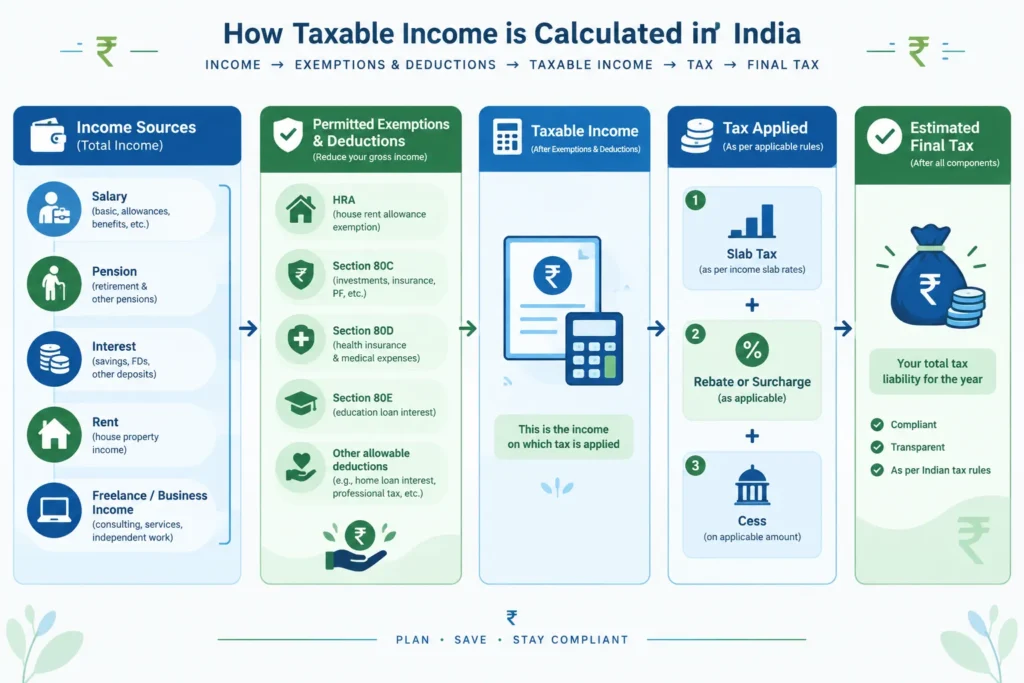
Diagram showing how income, deductions, tax rates, rebate, surcharge and cess lead to estimated tax

Taxable income is the amount on which slab rates and other applicable tax rates are calculated. It is not always the same as gross salary or total money received during the year.

A simplified calculation starts with income from salary, house property, business or profession, capital gains and other sources. Eligible exemptions, deductions and permitted adjustments are then applied according to the selected regime.

Some deductions depend on taxpayer status. For example, certain benefits are available only to resident individuals, salaried taxpayers, senior citizens or people making specified payments. An income tax calculator must therefore ask for more than annual salary alone.

Rebate and Marginal Relief

Under the new regime, a qualifying resident individual with total income of up to ₹12,00,000 can generally claim a rebate under Section 87A of up to ₹60,000 on eligible tax. This can reduce the tax on normal slab-rate income to zero.

Under the old regime, a qualifying resident individual with total income of up to ₹5,00,000 can generally claim a Section 87A rebate of up to ₹12,500.

The rebate is not a deduction from income. Tax is calculated first, and the eligible rebate is then reduced from that tax. Non-residents cannot claim this rebate. Income taxable at certain special rates may also receive different treatment.

Marginal relief under the new-regime rebate rules may apply when total income is slightly above ₹12,00,000. It limits the excess tax so that it does not exceed the amount by which total income crosses ₹12,00,000, subject to the applicable rules.

Surcharge and Health and Education Cess

Surcharge is an additional charge on income tax for higher-income taxpayers. For individuals, it can begin when total income exceeds ₹50 lakh. Rates rise at specified income thresholds, including ₹1 crore, ₹2 crore and ₹5 crore.

Under the new regime, the maximum surcharge rate for individuals is generally 25%. Under the old regime, it can reach 37%, although lower caps apply to tax on certain types of income. Surcharge marginal relief may be available when income only slightly exceeds a surcharge threshold.

After income tax, rebate and surcharge are considered, Health and Education Cess is charged at 4% of the tax plus surcharge. A calculator should include this cess in the final estimated liability.

Hypothetical Calculation: Salary of ₹15 Lakh

Consider a salaried resident individual below 60 with gross salary of ₹15,00,000. Assume the person has an eligible HRA exemption of ₹1,50,000, Section 80C deduction of ₹1,50,000, Section 80D deduction of ₹25,000 and additional NPS deduction of ₹50,000. This is only an illustration and excludes special-rate income.

CalculationOld regimeNew regime
Gross salary₹15,00,000₹15,00,000
Standard deduction₹50,000₹75,000
HRA exemption₹1,50,000Not allowed
Section 80C₹1,50,000Not allowed
Section 80D₹25,000Not allowed
Additional NPS deduction₹50,000Not allowed
Estimated taxable income₹10,75,000₹14,25,000
Income tax before cess₹1,35,000₹93,750
Health and Education Cess at 4%₹5,400₹3,750
Estimated final tax₹1,40,400₹97,500

In this example, the new regime produces a lower estimated tax by ₹42,900, even though the person has several old-regime deductions. Another person with a different HRA amount, home-loan position, salary structure or eligible deductions could get a different result.

This is why an income tax calculator should compare both regimes using the same complete income details. The lower-tax option can change with income level, exemptions, deductions, employer benefits, special-rate income, residential status and age. Taxpayers should also check whether they are legally allowed to choose or switch regimes, especially if they have business or professional income.

Choosing a Regime, FAQs and Important Disclaimer

An income tax calculator helps you compare the estimated tax under the Old Tax Regime and the New Tax Regime. However, the lower headline tax rate does not always produce the lowest final tax bill.

The Old Regime may be useful if you can claim substantial deductions and exemptions. These may include eligible Section 80C investments, health insurance premiums, home loan benefits and House Rent Allowance. The New Regime generally offers fewer deductions but has different slab rates and may require less tax planning paperwork.

How to Choose Between the Old and New Tax Regimes

Start by calculating your taxable income under each regime separately. Do not enter the same deductions in both columns unless the deduction is permitted under both regimes.

Use the following process:

  1. List every source of income: Include salary, pension, bank interest, rental income, capital gains and any other taxable income.
  2. Identify eligible exemptions and deductions: Check which benefits are available under each regime for the relevant financial year.
  3. Calculate tax under both regimes: Compare the final amount after rebate, surcharge and health and education cess, where applicable.
  4. Check documentation: Make sure you have evidence for deductions or exemptions that you intend to claim.
  5. Consider compliance and cash flow: A deduction should not push you into an unsuitable investment merely to save tax.

For example, a salaried employee who pays rent and makes eligible investments may find the Old Regime more favourable. Another employee with few deductions may find the New Regime simpler or less expensive. The result depends on income, deductions, exemptions and the tax rules for that year.

Tax saving should also fit into your wider financial plan. The Personal Finance Guide can help you connect tax decisions with budgeting, insurance, emergency savings and long-term goals. If you are comparing tax-saving products, the PPF Calculator can illustrate long-term Public Provident Fund growth, while the FD Calculator can estimate fixed deposit maturity values. The SIP Calculator can help with goal-based mutual fund planning, but SIP investments do not automatically qualify for a tax deduction.

Employment benefits should be reviewed separately. For instance, the Gratuity Calculator can provide an estimate of gratuity based on the information entered, but the amount received and its tax treatment depend on applicable rules. Published tax-planning articles can also help you understand individual deductions before including them in your calculation.

Do not select an investment only because it may reduce tax. Check its lock-in period, risk, liquidity, expected return and suitability for your goal. A tax benefit cannot compensate for a product that does not meet your financial needs.

Frequently Asked Questions

1. Who can use the income tax calculator?

Salaried employees, pensioners, self-employed individuals and other individual taxpayers can use an income tax calculator for an initial estimate. It may also be useful for people earning interest, rent or income from more than one source.

The calculator must be used with the correct financial year, age category, residential status and income details. Special-rate income, such as certain capital gains or lottery winnings, may require a separate calculation or additional professional review.

2. Is the New Tax Regime the default regime?

The New Tax Regime is the default regime under current income-tax provisions. This does not necessarily mean that every taxpayer must remain in it. Eligible taxpayers may be able to choose the Old Regime by following the applicable procedure and timelines.

The rules for switching can differ for taxpayers with business or professional income. Salaried taxpayers should also distinguish between informing an employer for TDS purposes and making the final eligible choice while filing the income tax return.

3. Can I claim HRA and Section 80C deductions in the New Regime?

House Rent Allowance exemption and most common Section 80C deductions are generally associated with the Old Regime and are usually not available under the New Regime. However, tax rules contain specific exceptions and conditions, so each item should be checked individually.

Do not assume that an investment is deductible merely because it appears under Section 80C. You must also satisfy eligibility, payment, ownership and documentation requirements. The total deduction may be subject to an overall statutory limit.

4. Is the standard deduction available under both regimes?

Eligible salary and pension income may receive a standard deduction under both regimes under current rules. The permitted amount can differ between regimes and may change through a future Budget or amendment.

A family pension is not always treated in the same way as a pension received by a retired employee. Select the correct income category in the calculator and verify the deduction applicable to the relevant financial year.

5. How do rebate and marginal relief affect the calculation?

A rebate can reduce tax for eligible resident individuals whose taxable income is within the prescribed conditions. Rebate limits and availability can differ between the Old and New Regimes. It is applied to tax and should not be confused with a deduction from income.

Marginal relief may apply in specified situations where income crosses a threshold by a small amount and the resulting additional tax would otherwise be disproportionately high. Depending on the provision involved, this may relate to rebate rules or surcharge thresholds. A basic calculator may not handle every marginal-relief situation correctly.

6. Does the result include surcharge and cess?

A complete estimate should apply surcharge where the relevant income threshold and conditions are met. It should then apply health and education cess at the applicable rate.

Surcharge treatment may depend on the amount and type of income, and marginal relief may also be relevant. Taxpayers with high income or income taxed at special rates should review the detailed calculation rather than relying only on the final number.

7. Can I include pension, interest, rent or other income?

Yes. Include all taxable income in the appropriate fields. Pension from a former employer is generally considered salary income, while family pension is normally reported under income from other sources. Bank interest, rental income and other receipts may have separate deduction or tax-treatment rules.

Capital gains should not be added blindly to ordinary slab income because different assets and holding periods can attract different tax treatment. Also remember that TDS is only tax already deducted; it is not necessarily your final tax liability.

8. Can calculator results replace advice from a tax professional?

No. An income tax calculator is an estimation and comparison tool. It cannot fully evaluate complex capital gains, foreign income, business losses, multiple house properties, residential-status questions, disputed deductions or unusual transactions.

Consider consulting a qualified tax professional when your return is complex, the amount involved is significant or you are uncertain about eligibility. Professional review may also be helpful before changing a tax position taken in an earlier year.

Use the Calculator Before Making Your Choice

Enter complete and accurate figures in the income tax calculator, calculate both regimes, and compare the final estimated tax rather than only the slab rates. Recheck salary components, deductions, exemptions, other income, rebate, surcharge, cess and TDS before acting on the result.

Disclaimer: Calculator results are estimates based on the information entered and the rules configured for the selected period. Tax provisions, limits, eligibility conditions and interpretations can change or vary by taxpayer. Verify statutory details through official government sources and obtain professional assistance where necessary. This page does not provide personalised tax, legal or investment advice.

Leave a Comment

Contact RegularStation: klassicweb@gmail.com | +91 9376859993