

12 Tips to Secure Your Hardware Wallet

A hardware wallet keeps the private keys used to approve cryptocurrency transactions away from an internet-connected computer or phone. This can reduce several online risks, but the device cannot protect you from every mistake, scam…

12 Tips to Secure Your Hardware Wallet

A hardware wallet keeps the private keys used to approve cryptocurrency transactions away from an internet-connected computer or phone. This can reduce several online risks, but the device cannot protect you from every mistake, scam or physical threat.

Your recovery phrase, purchasing choices, transaction checks and backup plan are just as important as the wallet itself. The following 12 practical tips explain how Indian cryptocurrency users can set up and use a hardware wallet safely without assuming that every model has the same features.

Why hardware wallet security matters
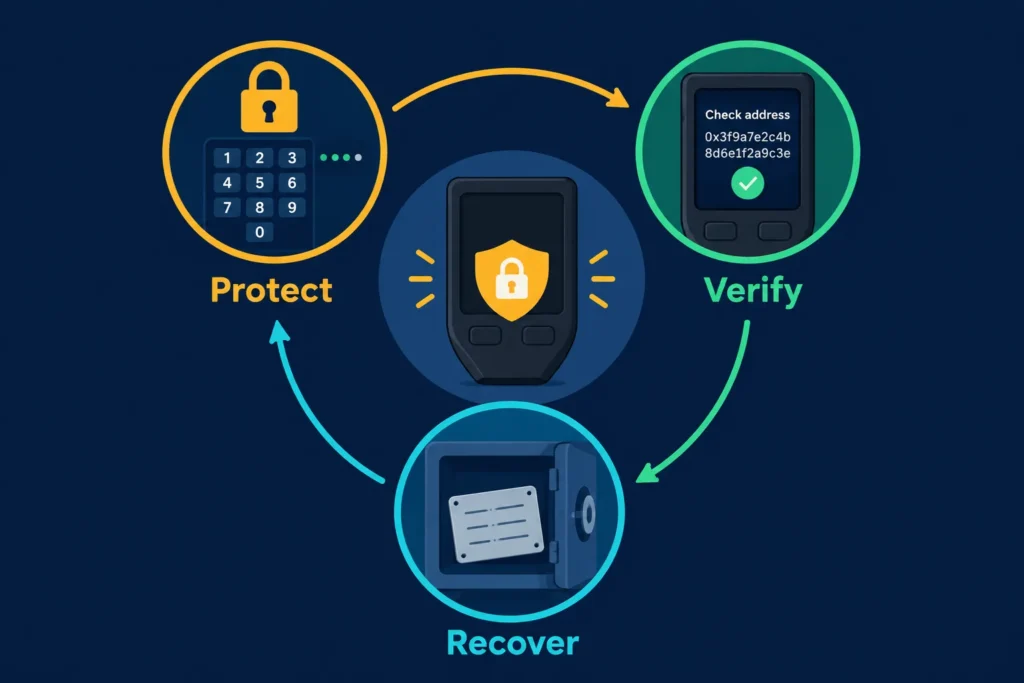
Three-part hardware wallet security framework covering access, verification and recovery

A hardware wallet does not actually hold coins inside the device. Your cryptocurrency remains recorded on its blockchain. The wallet protects the private keys that let you control those assets and signs transactions when you approve them.

This protection can fail if someone obtains your recovery phrase, tricks you into approving a malicious transaction or replaces an address before you send funds. You can also lose access by forgetting an optional passphrase or creating an unusable backup.

Good wallet security therefore has three parts:

  • Protect access: Keep the device, PIN, recovery phrase and any optional passphrase secure.
  • Verify actions: Check important transaction details on the hardware wallet’s own trusted screen.
  • Prepare for recovery: Maintain an accurate offline backup and understand how restoration works before an emergency occurs.

12 practical tips to secure your hardware wallet

1. Buy the wallet through an official or authorised channel

Start with a device whose origin you can verify. Purchase directly from the manufacturer or from a seller that the manufacturer identifies as authorised. Be cautious with unusually cheap devices, unverified marketplace sellers and second-hand wallets.

A used or tampered device may have been altered or supplied with a recovery phrase already known to another person. A new wallet should normally generate its recovery phrase during setup. Never use a phrase printed on a card, sent by a seller or included in packaging as a ready-made backup.

When the package arrives:

  • Compare its condition and contents with the manufacturer’s current packaging guidance.
  • Follow the official authenticity or device-verification process, if one is available.
  • Do not ignore authenticity, tampering or firmware warnings.
  • Contact the manufacturer through its official website if anything appears unusual.

Packaging and seals differ between models, so do not rely on a seal alone as proof that a device is genuine.

Cryptocurrency in India: A Complete Beginner’s Guide to Crypto

2. Set up the device privately and follow official instructions

Complete the initial setup in a private place where nobody can watch, photograph or record the recovery phrase. Avoid public spaces, shared work areas and locations covered by security cameras.

Use only the setup guide, application and website identified by the manufacturer. Type the official address yourself or use a trusted bookmark rather than clicking an advertisement or an unsolicited search result. Check the domain carefully before downloading anything.

During setup, read every message on the device screen. If the instructions on the computer conflict with the hardware wallet’s screen or official documentation, stop. Do not bypass an authenticity warning or install unofficial firmware to make the device work.

Before transferring a large amount, learn how to receive funds, verify an address and send a small test transaction. This reduces the chance of an expensive beginner error.

3. Protect the recovery phrase as the master backup

The recovery phrase, sometimes called a seed phrase, is a list of words that can restore access to the wallet’s keys on a compatible device. Anyone who obtains the complete phrase may be able to control the associated cryptocurrency without possessing the original hardware wallet.

Write the words down accurately and keep the backup offline in a secure, protected location. Some users choose a durable physical backup that is more resistant to fire or water, but it must still be protected from discovery and theft.

Never store the recovery phrase in:

  • screenshots or photographs;
  • email or cloud storage;
  • messaging applications;
  • ordinary digital notes, password documents or spreadsheets;
  • a website or a normal computer or phone application.
You May Also Like:Moving Averages in Crypto: SMA vs EMA Explained

A legitimate support representative should never ask for the recovery phrase. Do not type it into a support form, wallet-verification page or website. Enter it only when restoring through the secure process specified by the wallet manufacturer, usually directly on the hardware device when the model supports that method.

4. Create an accurate backup without unnecessary exposure

Check every recovery word, its spelling and its position during setup. A phrase with the correct words in the wrong order may not restore the intended wallet. Use the manufacturer’s built-in backup verification feature if your device provides one.

Do not test a backup by entering it into an ordinary computer application or random online tool. If you want to perform a recovery test, first understand the manufacturer’s official procedure and the risks involved.

More copies do not automatically mean better security. Several copies may improve protection against fire or loss, but each additional copy is another item that can be found or stolen. If you maintain more than one copy, place each in an appropriately secured location and keep track of who could access it.

Likewise, do not casually split the words between locations. Losing one part could make recovery impossible, while poorly designed splitting may provide less protection than expected. Advanced backup schemes should be used only when they are supported by the wallet and you fully understand their recovery process.

5. Use a strong device PIN and keep it separate

The device PIN and recovery phrase serve different purposes. The PIN helps prevent someone holding the hardware wallet from using it. The recovery phrase can recreate access to the wallet, often without the original device.

Choose a PIN that is not easy to guess. Avoid birth dates, repeated digits, phone-number fragments and familiar patterns. Do not reuse a banking PIN or phone unlock code. Enter it discreetly so that nearby people or cameras cannot observe it.

Never write the PIN on the device or store it beside the wallet. Do not share it with friends, traders or support staff. Some models erase or lock themselves after repeated incorrect attempts, but the exact behaviour varies. Read your manufacturer’s documentation before experimenting.

If you forget the PIN, recovery generally requires the recovery phrase. Confirm the procedure for your model instead of repeatedly guessing and risking a reset.

10 Popular Types of Cryptocurrency and How They Work

6. Treat an optional passphrase as an advanced feature

Certain hardware wallets support an optional passphrase that creates or unlocks a separate wallet in addition to the recovery phrase. This is not the same as the device PIN, and not every wallet implements the feature in the same way.

A passphrase can provide extra protection if a recovery phrase is exposed, but it also introduces a serious recovery risk. A mistyped passphrase may open a different, empty wallet, and losing the exact passphrase can make the associated funds inaccessible even when you still have the recovery words.

Before enabling one:

  • Confirm that your particular model supports it.
  • Read the manufacturer’s recovery instructions.
  • Decide how it will be backed up separately from the recovery phrase.
  • Test the setup carefully with a small amount.
  • Make sure a trusted inheritance plan does not depend on information nobody else can find.

Beginners should not enable a passphrase simply because it sounds more secure. A setup you can recover reliably is better than a complicated arrangement you do not understand.

7. Verify every transaction on the hardware wallet screen
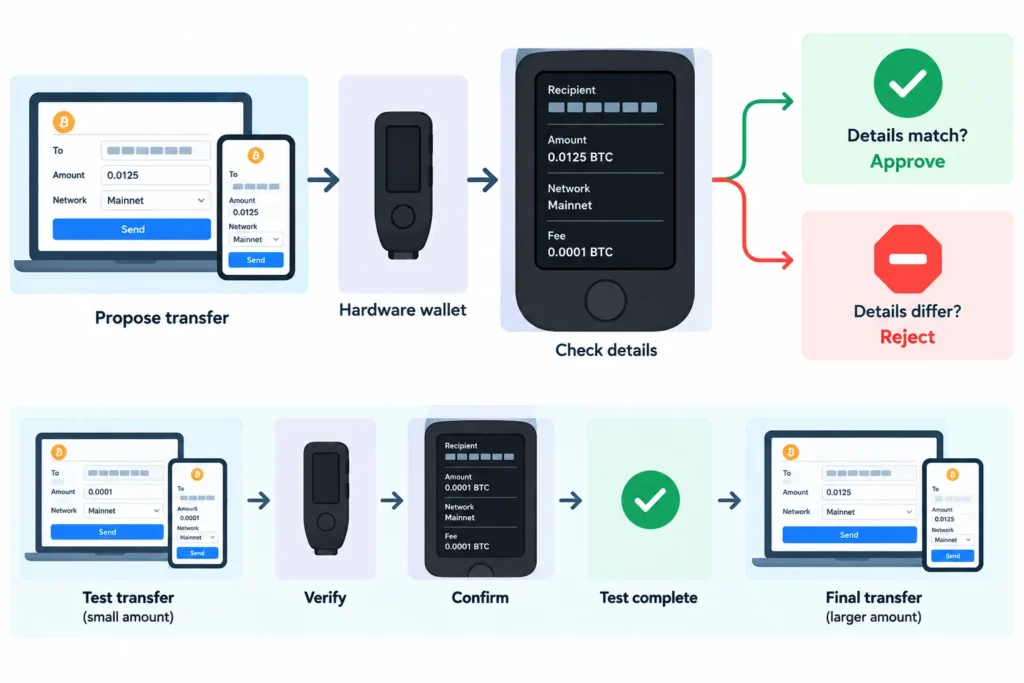
Flowchart for checking address, amount, network and fee before approving a transaction

Malware on a computer or smartphone can replace a copied cryptocurrency address with an attacker’s address. A compromised wallet application may also present a transaction that differs from what the hardware device is being asked to sign.

Before approving, check the details displayed on the hardware wallet itself:

  • the recipient address, including more than only the first and last few characters;
  • the amount;
  • the correct blockchain network;
  • the transaction fee and any other details the device can display;
  • the action requested by a smart contract, where readable information is available.
You May Also Like:What Is RSI in Crypto Trading? How the Indicator Works

Do not trust the computer or phone display alone. The hardware wallet screen is intended to show what the device will sign. If details do not match, reject the transaction.

For a new address or network, send a small test amount first and confirm receipt before sending the balance. Also confirm that the receiving platform supports the selected network. Funds sent through an incompatible network may be difficult or impossible to recover.

8. Update firmware and wallet applications safely

Firmware is the software that runs inside the hardware wallet. Updates may fix security issues, improve compatibility or add features. Use firmware and companion applications only from official manufacturer channels.

Follow the manufacturer’s model-specific update instructions. Before starting, confirm that your recovery backup is accurate, protected and available in case the update resets the device. Never enter the phrase into a website merely because an update message tells you to do so.

A safe update checklist includes:

  • Open the official application or carefully verify the manufacturer’s website.
  • Read the release notes and confirm that the update applies to your model.
  • Check that the device has sufficient power and a reliable connection.
  • Follow the instructions shown by the official application and device.
  • Stop if you receive unexpected recovery-phrase or authenticity requests.

Do not install unofficial firmware, disable security checks or bypass authenticity warnings. Update behaviour varies, so general internet instructions should not replace the manufacturer’s documentation.

How to Track Whale Activity in Crypto: Tools & Tips for Smart Investors

9. Recognise phishing, fake support and malicious QR codes

Phishing attempts try to make you reveal information or approve a harmful action. They may appear as fake manufacturer websites, fraudulent emails, sponsored search advertisements, fake social-media support accounts or direct messages offering urgent assistance.

Common warning signs include:

  • a request to “verify”, “synchronise” or “unlock” a wallet with the recovery phrase;
  • a message claiming that your wallet will be suspended unless you act immediately;
  • a fake airdrop or token claim requiring a wallet connection and approval;
  • an unknown QR code that opens a payment address or malicious website;
  • support staff contacting you first through social media;
  • a download hosted outside the manufacturer’s official channels.

Urgency is designed to prevent careful checking. Pause, close the message and independently open the manufacturer’s official site. Never give a recovery phrase to support. Before scanning a QR code, know who supplied it and confirm the resulting address or website.

10. Secure the computer or smartphone connected to the wallet

A hardware wallet can keep private keys isolated, but an infected computer or phone can still mislead you about addresses, balances or transaction requests. Keep the operating system, browser and security software updated. Install applications only from trusted sources and remove software you no longer use.

Use a dedicated user account or a separate, well-maintained device for cryptocurrency activity if that is practical. Avoid public computers and shared machines where you cannot control installed software. Lock your phone and computer with a strong password or device-supported authentication.

Browser extensions deserve special care because a malicious extension may alter web pages or copied addresses. Keep only necessary extensions and verify their source.

A VPN may protect network traffic in certain situations, but it does not prevent recovery-phrase theft, malicious approvals or address replacement. It is not a substitute for secure backups, official software and on-device verification.

11. Store the device securely and plan for physical risks

Keep the hardware wallet somewhere private and protected from theft, accidental disposal, heat, water and physical damage. Do not display it publicly or discuss the location of the device and backup unnecessarily.

The device and recovery phrase should generally not be stored together. If both are taken in the same incident, the backup may remove the protection offered by the PIN. However, the exact storage plan should consider your household, access controls and local conditions.

A home safe or secure deposit facility may be suitable for some users, but each option has practical limitations. Consider whether you can access the backup during an emergency and whether another person could access it without permission.

A Faraday cage is not a standard or essential hardware-wallet measure. Protecting the recovery phrase, verifying transactions and controlling physical access are more relevant for most users.

You May Also Like:How to Research a Cryptocurrency Before Trading It

12. Consider multi-signature only when you can manage it

Multi-signature, or multisig, is an advanced arrangement that requires more than one key to approve a transaction. For example, a setup may require two keys from a group of three. It can reduce dependence on a single device or backup.

However, multisig is not supported in the same way by every hardware wallet or cryptocurrency. It adds complexity to setup, backups, wallet software and recovery. A mistake in recording the wallet configuration or managing the required keys may cause loss of access.

Use multisig only after understanding:

  • which devices, assets and applications are compatible;
  • how many keys are needed to approve transactions;
  • where each key and configuration backup will be stored;
  • how recovery works if one signer is unavailable;
  • how heirs or trusted persons can follow the plan.

Do not assume that biometrics, two-factor authentication, encryption options or multisig are available on every device. Check the documentation for your exact wallet model.

What to do if a hardware wallet is stolen
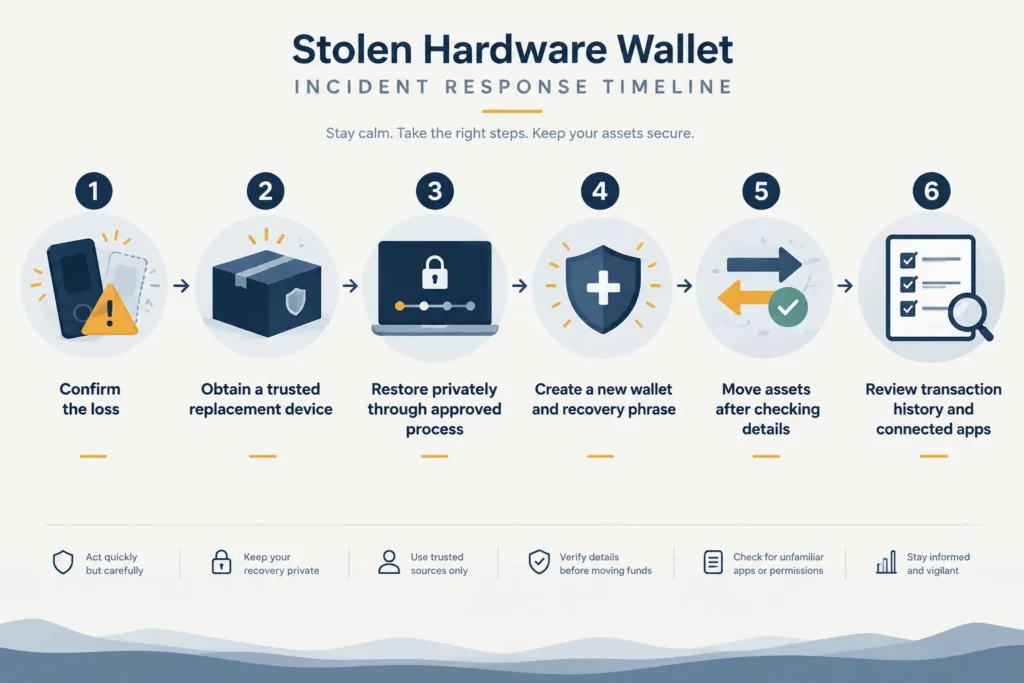
Six-step timeline for responding to a lost or stolen hardware wallet

Loss of the physical device does not automatically mean the cryptocurrency is lost. The assets remain on the blockchain, and an accurate recovery phrase can usually restore access through a compatible wallet. However, act promptly because the thief may try to guess the PIN.

  1. Stay calm and verify the situation: Check whether the device was misplaced rather than stolen, but do not delay if unauthorised access is possible.
  2. Obtain a trusted replacement: Use a genuine device or another compatible recovery method recommended by the manufacturer.
  3. Restore privately: Follow official instructions and enter the recovery phrase only through the approved secure recovery process.
  4. Create a new wallet: Generate a new recovery phrase on a trusted device.
  5. Move the assets: Transfer funds from the recovered wallet to addresses controlled by the new phrase, verifying every detail on the device screen.
  6. Review accounts: Check transaction history and any connected applications for activity you did not approve.

If the recovery phrase may also have been exposed, treat the situation as more urgent. Avoid public discussion of the theft and be cautious of people offering recovery services.

Common hardware wallet security mistakes

  • Using a recovery phrase supplied by a seller or found inside the package.
  • Photographing the phrase or saving it in email, cloud storage or a messaging app.
  • Entering recovery words into a fake verification or support website.
  • Approving a transaction without checking the address, amount and network on the device.
  • Installing wallet software from advertisements, unofficial app listings or message links.
  • Keeping the hardware wallet and its recovery backup in the same easily accessible place.
  • Enabling a passphrase or multisig setup without testing recovery.
  • Sending a large amount before completing a small test transaction.
  • Assuming that a hardware wallet makes an infected computer harmless.
  • Failing to leave a secure, understandable recovery or inheritance plan.

Are hardware wallets 100% safe?

No security tool is completely safe. A hardware wallet can reduce exposure of private keys to internet-connected devices, but it cannot prevent every phishing attack, physical theft, supply-chain problem, software vulnerability or user error.

Its effectiveness depends on safe purchasing, correct setup, offline backup protection and careful transaction verification. Use the manufacturer’s official instructions for model-specific actions and regularly review whether your recovery plan still works.

You May Also Like:Crypto Support and Resistance Levels Explained: A Beginner’s Guide

Frequently asked questions

1. What happens if I lose my hardware wallet?

You can generally restore access on a compatible device using the recovery phrase. Restore through the manufacturer-approved process, create a new wallet and move the assets if the lost device may be in someone else’s possession.

2. Can someone steal my cryptocurrency with only the hardware wallet?

A PIN may block immediate access, but the protection and retry limits depend on the model. Treat a stolen device seriously and transfer assets to a new wallet rather than assuming the thief cannot use it.

3. Is it safe to keep a recovery phrase on my phone?

No. Do not photograph it or store it in notes, email, cloud services or messaging apps. Keep it offline in a physically protected location.

4. Can customer support ask for my recovery phrase?

No legitimate support team should need your complete recovery phrase. Anyone asking for it should be treated as a potential scammer.

5. What is the difference between a PIN and a recovery phrase?

The PIN unlocks the physical device. The recovery phrase can recreate access to the wallet’s keys, usually on another compatible device. Exposure of the recovery phrase is therefore especially serious.

6. Should I use a passphrase?

Only if your wallet supports it and you understand its operation and backup requirements. Losing or mistyping an enabled passphrase can prevent access to the wallet associated with it.

7. Do I need to update hardware wallet firmware?

Updates can contain important fixes and improvements. Use only official channels, follow the manufacturer’s instructions and confirm that your offline recovery backup is available before updating.

8. Can I connect a hardware wallet to any computer?

Avoid public, shared or poorly maintained computers. Even though the private keys remain on the device, malware can replace addresses or present misleading transaction information.

9. Should I send a test transaction first?

Yes, especially when using a new address, asset or network. Send a small amount, verify its arrival and then send the remaining amount after checking the details again.

10. Is multi-signature necessary for beginners?

No. Multisig can improve resilience in a carefully designed setup, but it creates additional backup and recovery responsibilities. Beginners should first master a standard hardware-wallet setup.

Conclusion

A hardware wallet is most useful when it is supported by careful habits. Buy through a trusted channel, protect the recovery phrase offline, use a strong PIN and verify every transaction on the device screen. Download software and firmware only through official manufacturer channels.

Advanced features such as passphrases and multisig can help some users, but they should be enabled only with a tested recovery plan. The goal is not maximum complexity; it is a secure setup that you can understand, use and recover when necessary.


Share this article
KEEP READING

Related Articles

View all →

12 Tips to Secure Your Hardware Wallet

A hardware wallet keeps the private keys used to approve cryptocurrency transactions away from an internet-connected computer or phone. This can reduce several online risks, but the device cannot protect you from every mistake, scam or physical threat.

Your recovery phrase, purchasing choices, transaction checks and backup plan are just as important as the wallet itself. The following 12 practical tips explain how Indian cryptocurrency users can set up and use a hardware wallet safely without assuming that every model has the same features.

Why hardware wallet security matters

Three-part hardware wallet security framework covering access, verification and recovery

A hardware wallet does not actually hold coins inside the device. Your cryptocurrency remains recorded on its blockchain. The wallet protects the private keys that let you control those assets and signs transactions when you approve them.

This protection can fail if someone obtains your recovery phrase, tricks you into approving a malicious transaction or replaces an address before you send funds. You can also lose access by forgetting an optional passphrase or creating an unusable backup.

Good wallet security therefore has three parts:

  • Protect access: Keep the device, PIN, recovery phrase and any optional passphrase secure.
  • Verify actions: Check important transaction details on the hardware wallet’s own trusted screen.
  • Prepare for recovery: Maintain an accurate offline backup and understand how restoration works before an emergency occurs.

12 practical tips to secure your hardware wallet

1. Buy the wallet through an official or authorised channel

Start with a device whose origin you can verify. Purchase directly from the manufacturer or from a seller that the manufacturer identifies as authorised. Be cautious with unusually cheap devices, unverified marketplace sellers and second-hand wallets.

A used or tampered device may have been altered or supplied with a recovery phrase already known to another person. A new wallet should normally generate its recovery phrase during setup. Never use a phrase printed on a card, sent by a seller or included in packaging as a ready-made backup.

When the package arrives:

  • Compare its condition and contents with the manufacturer’s current packaging guidance.
  • Follow the official authenticity or device-verification process, if one is available.
  • Do not ignore authenticity, tampering or firmware warnings.
  • Contact the manufacturer through its official website if anything appears unusual.

Packaging and seals differ between models, so do not rely on a seal alone as proof that a device is genuine.

Cryptocurrency in India: A Complete Beginner’s Guide to Crypto

2. Set up the device privately and follow official instructions

Complete the initial setup in a private place where nobody can watch, photograph or record the recovery phrase. Avoid public spaces, shared work areas and locations covered by security cameras.

Use only the setup guide, application and website identified by the manufacturer. Type the official address yourself or use a trusted bookmark rather than clicking an advertisement or an unsolicited search result. Check the domain carefully before downloading anything.

During setup, read every message on the device screen. If the instructions on the computer conflict with the hardware wallet’s screen or official documentation, stop. Do not bypass an authenticity warning or install unofficial firmware to make the device work.

Before transferring a large amount, learn how to receive funds, verify an address and send a small test transaction. This reduces the chance of an expensive beginner error.

3. Protect the recovery phrase as the master backup

The recovery phrase, sometimes called a seed phrase, is a list of words that can restore access to the wallet’s keys on a compatible device. Anyone who obtains the complete phrase may be able to control the associated cryptocurrency without possessing the original hardware wallet.

Write the words down accurately and keep the backup offline in a secure, protected location. Some users choose a durable physical backup that is more resistant to fire or water, but it must still be protected from discovery and theft.

Never store the recovery phrase in:

  • screenshots or photographs;
  • email or cloud storage;
  • messaging applications;
  • ordinary digital notes, password documents or spreadsheets;
  • a website or a normal computer or phone application.

A legitimate support representative should never ask for the recovery phrase. Do not type it into a support form, wallet-verification page or website. Enter it only when restoring through the secure process specified by the wallet manufacturer, usually directly on the hardware device when the model supports that method.

4. Create an accurate backup without unnecessary exposure

Check every recovery word, its spelling and its position during setup. A phrase with the correct words in the wrong order may not restore the intended wallet. Use the manufacturer’s built-in backup verification feature if your device provides one.

Do not test a backup by entering it into an ordinary computer application or random online tool. If you want to perform a recovery test, first understand the manufacturer’s official procedure and the risks involved.

More copies do not automatically mean better security. Several copies may improve protection against fire or loss, but each additional copy is another item that can be found or stolen. If you maintain more than one copy, place each in an appropriately secured location and keep track of who could access it.

Likewise, do not casually split the words between locations. Losing one part could make recovery impossible, while poorly designed splitting may provide less protection than expected. Advanced backup schemes should be used only when they are supported by the wallet and you fully understand their recovery process.

5. Use a strong device PIN and keep it separate

The device PIN and recovery phrase serve different purposes. The PIN helps prevent someone holding the hardware wallet from using it. The recovery phrase can recreate access to the wallet, often without the original device.

Choose a PIN that is not easy to guess. Avoid birth dates, repeated digits, phone-number fragments and familiar patterns. Do not reuse a banking PIN or phone unlock code. Enter it discreetly so that nearby people or cameras cannot observe it.

Never write the PIN on the device or store it beside the wallet. Do not share it with friends, traders or support staff. Some models erase or lock themselves after repeated incorrect attempts, but the exact behaviour varies. Read your manufacturer’s documentation before experimenting.

If you forget the PIN, recovery generally requires the recovery phrase. Confirm the procedure for your model instead of repeatedly guessing and risking a reset.

10 Popular Types of Cryptocurrency and How They Work

6. Treat an optional passphrase as an advanced feature

Certain hardware wallets support an optional passphrase that creates or unlocks a separate wallet in addition to the recovery phrase. This is not the same as the device PIN, and not every wallet implements the feature in the same way.

A passphrase can provide extra protection if a recovery phrase is exposed, but it also introduces a serious recovery risk. A mistyped passphrase may open a different, empty wallet, and losing the exact passphrase can make the associated funds inaccessible even when you still have the recovery words.

Before enabling one:

  • Confirm that your particular model supports it.
  • Read the manufacturer’s recovery instructions.
  • Decide how it will be backed up separately from the recovery phrase.
  • Test the setup carefully with a small amount.
  • Make sure a trusted inheritance plan does not depend on information nobody else can find.

Beginners should not enable a passphrase simply because it sounds more secure. A setup you can recover reliably is better than a complicated arrangement you do not understand.

7. Verify every transaction on the hardware wallet screen

Flowchart for checking address, amount, network and fee before approving a transaction

Malware on a computer or smartphone can replace a copied cryptocurrency address with an attacker’s address. A compromised wallet application may also present a transaction that differs from what the hardware device is being asked to sign.

Before approving, check the details displayed on the hardware wallet itself:

  • the recipient address, including more than only the first and last few characters;
  • the amount;
  • the correct blockchain network;
  • the transaction fee and any other details the device can display;
  • the action requested by a smart contract, where readable information is available.

Do not trust the computer or phone display alone. The hardware wallet screen is intended to show what the device will sign. If details do not match, reject the transaction.

For a new address or network, send a small test amount first and confirm receipt before sending the balance. Also confirm that the receiving platform supports the selected network. Funds sent through an incompatible network may be difficult or impossible to recover.

8. Update firmware and wallet applications safely

Firmware is the software that runs inside the hardware wallet. Updates may fix security issues, improve compatibility or add features. Use firmware and companion applications only from official manufacturer channels.

Follow the manufacturer’s model-specific update instructions. Before starting, confirm that your recovery backup is accurate, protected and available in case the update resets the device. Never enter the phrase into a website merely because an update message tells you to do so.

A safe update checklist includes:

  • Open the official application or carefully verify the manufacturer’s website.
  • Read the release notes and confirm that the update applies to your model.
  • Check that the device has sufficient power and a reliable connection.
  • Follow the instructions shown by the official application and device.
  • Stop if you receive unexpected recovery-phrase or authenticity requests.

Do not install unofficial firmware, disable security checks or bypass authenticity warnings. Update behaviour varies, so general internet instructions should not replace the manufacturer’s documentation.

How to Track Whale Activity in Crypto: Tools & Tips for Smart Investors

9. Recognise phishing, fake support and malicious QR codes

Phishing attempts try to make you reveal information or approve a harmful action. They may appear as fake manufacturer websites, fraudulent emails, sponsored search advertisements, fake social-media support accounts or direct messages offering urgent assistance.

Common warning signs include:

  • a request to “verify”, “synchronise” or “unlock” a wallet with the recovery phrase;
  • a message claiming that your wallet will be suspended unless you act immediately;
  • a fake airdrop or token claim requiring a wallet connection and approval;
  • an unknown QR code that opens a payment address or malicious website;
  • support staff contacting you first through social media;
  • a download hosted outside the manufacturer’s official channels.

Urgency is designed to prevent careful checking. Pause, close the message and independently open the manufacturer’s official site. Never give a recovery phrase to support. Before scanning a QR code, know who supplied it and confirm the resulting address or website.

10. Secure the computer or smartphone connected to the wallet

A hardware wallet can keep private keys isolated, but an infected computer or phone can still mislead you about addresses, balances or transaction requests. Keep the operating system, browser and security software updated. Install applications only from trusted sources and remove software you no longer use.

Use a dedicated user account or a separate, well-maintained device for cryptocurrency activity if that is practical. Avoid public computers and shared machines where you cannot control installed software. Lock your phone and computer with a strong password or device-supported authentication.

Browser extensions deserve special care because a malicious extension may alter web pages or copied addresses. Keep only necessary extensions and verify their source.

A VPN may protect network traffic in certain situations, but it does not prevent recovery-phrase theft, malicious approvals or address replacement. It is not a substitute for secure backups, official software and on-device verification.

11. Store the device securely and plan for physical risks

Keep the hardware wallet somewhere private and protected from theft, accidental disposal, heat, water and physical damage. Do not display it publicly or discuss the location of the device and backup unnecessarily.

The device and recovery phrase should generally not be stored together. If both are taken in the same incident, the backup may remove the protection offered by the PIN. However, the exact storage plan should consider your household, access controls and local conditions.

A home safe or secure deposit facility may be suitable for some users, but each option has practical limitations. Consider whether you can access the backup during an emergency and whether another person could access it without permission.

A Faraday cage is not a standard or essential hardware-wallet measure. Protecting the recovery phrase, verifying transactions and controlling physical access are more relevant for most users.

12. Consider multi-signature only when you can manage it

Multi-signature, or multisig, is an advanced arrangement that requires more than one key to approve a transaction. For example, a setup may require two keys from a group of three. It can reduce dependence on a single device or backup.

However, multisig is not supported in the same way by every hardware wallet or cryptocurrency. It adds complexity to setup, backups, wallet software and recovery. A mistake in recording the wallet configuration or managing the required keys may cause loss of access.

Use multisig only after understanding:

  • which devices, assets and applications are compatible;
  • how many keys are needed to approve transactions;
  • where each key and configuration backup will be stored;
  • how recovery works if one signer is unavailable;
  • how heirs or trusted persons can follow the plan.

Do not assume that biometrics, two-factor authentication, encryption options or multisig are available on every device. Check the documentation for your exact wallet model.

What to do if a hardware wallet is stolen

Six-step timeline for responding to a lost or stolen hardware wallet

Loss of the physical device does not automatically mean the cryptocurrency is lost. The assets remain on the blockchain, and an accurate recovery phrase can usually restore access through a compatible wallet. However, act promptly because the thief may try to guess the PIN.

  1. Stay calm and verify the situation: Check whether the device was misplaced rather than stolen, but do not delay if unauthorised access is possible.
  2. Obtain a trusted replacement: Use a genuine device or another compatible recovery method recommended by the manufacturer.
  3. Restore privately: Follow official instructions and enter the recovery phrase only through the approved secure recovery process.
  4. Create a new wallet: Generate a new recovery phrase on a trusted device.
  5. Move the assets: Transfer funds from the recovered wallet to addresses controlled by the new phrase, verifying every detail on the device screen.
  6. Review accounts: Check transaction history and any connected applications for activity you did not approve.

If the recovery phrase may also have been exposed, treat the situation as more urgent. Avoid public discussion of the theft and be cautious of people offering recovery services.

Common hardware wallet security mistakes

  • Using a recovery phrase supplied by a seller or found inside the package.
  • Photographing the phrase or saving it in email, cloud storage or a messaging app.
  • Entering recovery words into a fake verification or support website.
  • Approving a transaction without checking the address, amount and network on the device.
  • Installing wallet software from advertisements, unofficial app listings or message links.
  • Keeping the hardware wallet and its recovery backup in the same easily accessible place.
  • Enabling a passphrase or multisig setup without testing recovery.
  • Sending a large amount before completing a small test transaction.
  • Assuming that a hardware wallet makes an infected computer harmless.
  • Failing to leave a secure, understandable recovery or inheritance plan.

Are hardware wallets 100% safe?

No security tool is completely safe. A hardware wallet can reduce exposure of private keys to internet-connected devices, but it cannot prevent every phishing attack, physical theft, supply-chain problem, software vulnerability or user error.

Its effectiveness depends on safe purchasing, correct setup, offline backup protection and careful transaction verification. Use the manufacturer’s official instructions for model-specific actions and regularly review whether your recovery plan still works.

Frequently asked questions

1. What happens if I lose my hardware wallet?

You can generally restore access on a compatible device using the recovery phrase. Restore through the manufacturer-approved process, create a new wallet and move the assets if the lost device may be in someone else’s possession.

2. Can someone steal my cryptocurrency with only the hardware wallet?

A PIN may block immediate access, but the protection and retry limits depend on the model. Treat a stolen device seriously and transfer assets to a new wallet rather than assuming the thief cannot use it.

3. Is it safe to keep a recovery phrase on my phone?

No. Do not photograph it or store it in notes, email, cloud services or messaging apps. Keep it offline in a physically protected location.

4. Can customer support ask for my recovery phrase?

No legitimate support team should need your complete recovery phrase. Anyone asking for it should be treated as a potential scammer.

5. What is the difference between a PIN and a recovery phrase?

The PIN unlocks the physical device. The recovery phrase can recreate access to the wallet’s keys, usually on another compatible device. Exposure of the recovery phrase is therefore especially serious.

6. Should I use a passphrase?

Only if your wallet supports it and you understand its operation and backup requirements. Losing or mistyping an enabled passphrase can prevent access to the wallet associated with it.

7. Do I need to update hardware wallet firmware?

Updates can contain important fixes and improvements. Use only official channels, follow the manufacturer’s instructions and confirm that your offline recovery backup is available before updating.

8. Can I connect a hardware wallet to any computer?

Avoid public, shared or poorly maintained computers. Even though the private keys remain on the device, malware can replace addresses or present misleading transaction information.

9. Should I send a test transaction first?

Yes, especially when using a new address, asset or network. Send a small amount, verify its arrival and then send the remaining amount after checking the details again.

10. Is multi-signature necessary for beginners?

No. Multisig can improve resilience in a carefully designed setup, but it creates additional backup and recovery responsibilities. Beginners should first master a standard hardware-wallet setup.

Conclusion

A hardware wallet is most useful when it is supported by careful habits. Buy through a trusted channel, protect the recovery phrase offline, use a strong PIN and verify every transaction on the device screen. Download software and firmware only through official manufacturer channels.

Advanced features such as passphrases and multisig can help some users, but they should be enabled only with a tested recovery plan. The goal is not maximum complexity; it is a secure setup that you can understand, use and recover when necessary.

Contact RegularStation: klassicweb@gmail.com | +91 9376859993