

How to Secure Bitcoin
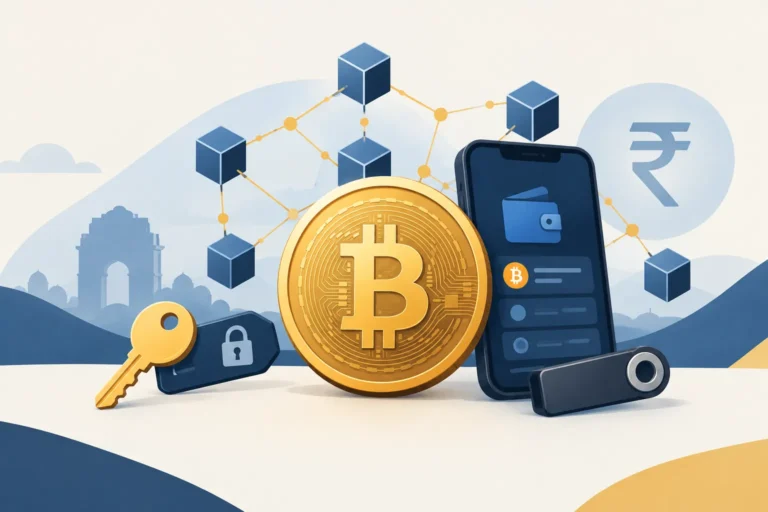
To secure Bitcoin, protect your private keys and recovery phrase, use a trusted wallet, keep your phone or computer updated, and verify every transaction carefully. Avoid sharing sensitive wallet information with anyone. For larger amounts, consider cold storage rather than leaving all your Bitcoin in an exchange account.
The Bitcoin network uses strong cryptography, but this does not automatically protect every user. Bitcoin can still be lost through phishing, fake applications, stolen passwords, compromised devices, exposed recovery phrases or the failure of an exchange. Confirmed Bitcoin transactions are generally irreversible, so preventing a mistake is much easier than recovering from one.
Bitcoin Security Basics and Choosing a Safer Wallet Setup
Learning how to secure Bitcoin begins with one important distinction: the Bitcoin network and your personal Bitcoin access are not the same thing.
Bitcoin’s network records transactions on a distributed blockchain and uses cryptographic rules to verify ownership and transfers. You can read our Bitcoin explained guide for a simple introduction to how this system works.
However, most Bitcoin theft does not require an attacker to break the Bitcoin network. Criminals usually target people, devices, wallets and online accounts instead. They may trick someone into revealing a password, install malicious software, copy a recovery phrase or gain control of an exchange account.
This is why Bitcoin security is partly technical and partly behavioural. A secure wallet cannot protect you if you willingly enter its recovery phrase on a fake website. Similarly, a careful user can still face problems if a device contains malware or a custodian fails.
Why Bitcoin Security Requires Extra Care
A bank may sometimes freeze a suspicious payment or help investigate an unauthorised transfer. Bitcoin works differently. Once a valid Bitcoin transaction is confirmed, it is generally not possible to cancel or reverse it through a central authority.
If Bitcoin is sent to a scammer or the wrong address, there is no standard chargeback process. If a private key is permanently lost and no usable backup exists, the associated Bitcoin may become inaccessible.
Common ways people lose Bitcoin include:
- Stolen login details: An attacker gets the email address, password or authentication code for an exchange account.
- Exposed recovery phrases: A user types the phrase into a fake wallet, website, form or support chat.
- Malicious applications: A fake or modified wallet application steals keys or changes transaction details.
- Compromised devices: Malware records typing, reads copied information or replaces a Bitcoin address in the clipboard.
- Scams and impersonation: A criminal pretends to be an exchange employee, investment adviser, government official or technical support agent.
- Custodial failure: An exchange or service may be hacked, freeze withdrawals, face financial trouble or stop operating.
- Lost backups: A damaged phone, forgotten password or misplaced recovery phrase can block access.
No setup removes every risk. The practical goal is to reduce avoidable risks and choose a wallet arrangement that matches your knowledge, amount invested and ability to manage backups.
Wallets, Private Keys and Recovery Phrases
A Bitcoin wallet does not hold coins in the same way that a physical wallet holds cash. Bitcoin remains recorded on the blockchain. The wallet manages the information needed to control and spend it.
A private key is secret information that authorises Bitcoin transactions. Anyone who obtains the relevant private key may be able to move the Bitcoin. It should never be shared in a message, email, online form or support call.
Many wallets provide a recovery phrase, sometimes called a seed phrase. It is usually a sequence of words that can restore access if the original device is lost or damaged. In practical terms, anyone with this phrase may be able to recreate the wallet and take its funds.
A wallet password and a recovery phrase are not interchangeable. A password may protect the wallet application on one device. The recovery phrase can often restore the entire wallet elsewhere. This makes the recovery phrase especially sensitive.
Do not photograph the phrase, save it in an ordinary notes application or upload it to cloud storage unless you fully understand the security risks. Keep any physical backup private, accurate and protected from theft, fire, water and accidental disposal.
For a fuller explanation of wallet types, backups and key management, see our crypto wallets guide.
Hot Wallets Versus Cold Storage
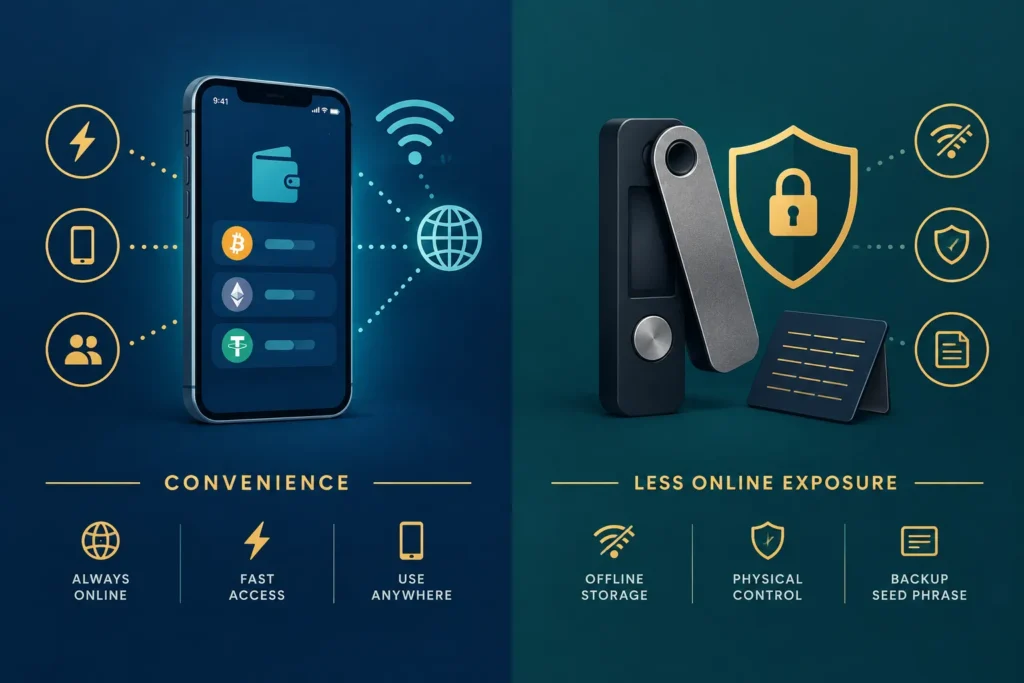
A hot wallet operates on an internet-connected phone, computer or browser. It is convenient for receiving Bitcoin, checking balances and making occasional payments. The trade-off is greater exposure to malicious software, unsafe downloads and online attacks.
Cold storage keeps the keys offline or on a specialised device designed to isolate them from an everyday computer or phone. It can reduce online exposure, making it useful for Bitcoin that is not needed for frequent transactions.
| Wallet setup | Main benefit | Main risk or trade-off |
|---|---|---|
| Hot wallet | Convenient for regular access and smaller transactions | More exposed to compromised devices and malicious applications |
| Cold storage | Reduces the private key’s exposure to the internet | Requires careful setup, backups and physical protection |
Cold storage is not automatically safe. A fake hardware device, an exposed recovery phrase or an incorrect backup can still cause loss. Beginners should first understand the setup and practise the recovery process with a small amount rather than moving substantial funds immediately.
Custodial Wallets Versus Self-Custody
With a custodial service, such as many crypto exchanges, the provider controls the private keys on your behalf. You usually access the Bitcoin through an account protected by a password and other security checks.
This can be easier for a beginner, but it creates dependence on the provider. The service may restrict withdrawals, experience a cyberattack, suffer an operational failure or become insolvent. Account access can also be lost if your email, password or authentication method is compromised.
With self-custody, you control the wallet’s private keys or recovery phrase. You do not need the custodian’s permission to move the Bitcoin. However, you become responsible for security, backups and recovery. There may be no company able to restore access if you lose the required information.
Neither model is perfect for every person. Custody offers convenience but requires trust in another organisation. Self-custody provides direct control but places more responsibility on the user.
Leaving a small amount on an exchange for a planned transaction is different from keeping a substantial long-term holding there. The more money concentrated with one custodian, the greater the impact if that account or provider fails. Our crypto exchanges guide explains how beginners can assess trading platforms and account protections in more detail.
How to Assess a Bitcoin Wallet
There is no universally best wallet. A suitable choice depends on how often you transact, the value involved, your technical comfort and whether you can maintain secure backups.
Before installing or funding a wallet, check the following:
- Official download source: Obtain the application from the developer’s verified website or an official app store listing. Do not trust links sent through unsolicited messages, advertisements or social media replies.
- Security model: Understand whether you or the provider controls the private keys. Look for a clear explanation of how transactions are authorised.
- Backup and recovery: Confirm how access can be restored if your device is lost. Make sure you can follow the process without exposing the recovery phrase.
- Update practices: Prefer software that receives security updates and has clear release information. Install legitimate updates promptly.
- Reputation and history: Look for independent technical scrutiny, transparent documentation and a meaningful operating history. Popularity alone is not proof of safety.
- Device protection: Use a screen lock, updated operating system and strong wallet password. Avoid installing wallets on rooted, jailbroken or shared devices.
- Transaction verification: Check the complete destination address and amount on the wallet screen before approving a transfer.
Begin with a small test transaction when using a new wallet or withdrawal address. This will not eliminate every risk, but it can reveal basic mistakes before a larger amount is involved.
Wallet security is only one part of responsible crypto use. For broader context on buying, holding, risks, taxation and regulation, refer to our Cryptocurrency in India beginner’s guide.
Practical Protection for Backups, Accounts, Devices and Transactions
Learning how to secure Bitcoin is not only about choosing a wallet. You also need to protect your backup, online accounts, devices and every transaction you make. A single mistake, such as sharing a recovery phrase or installing a fake wallet app, can allow a scammer to take your Bitcoin.
Bitcoin transactions generally cannot be cancelled by a bank, wallet provider or exchange. This makes careful security habits especially important.
Create and Protect Your Wallet Backup
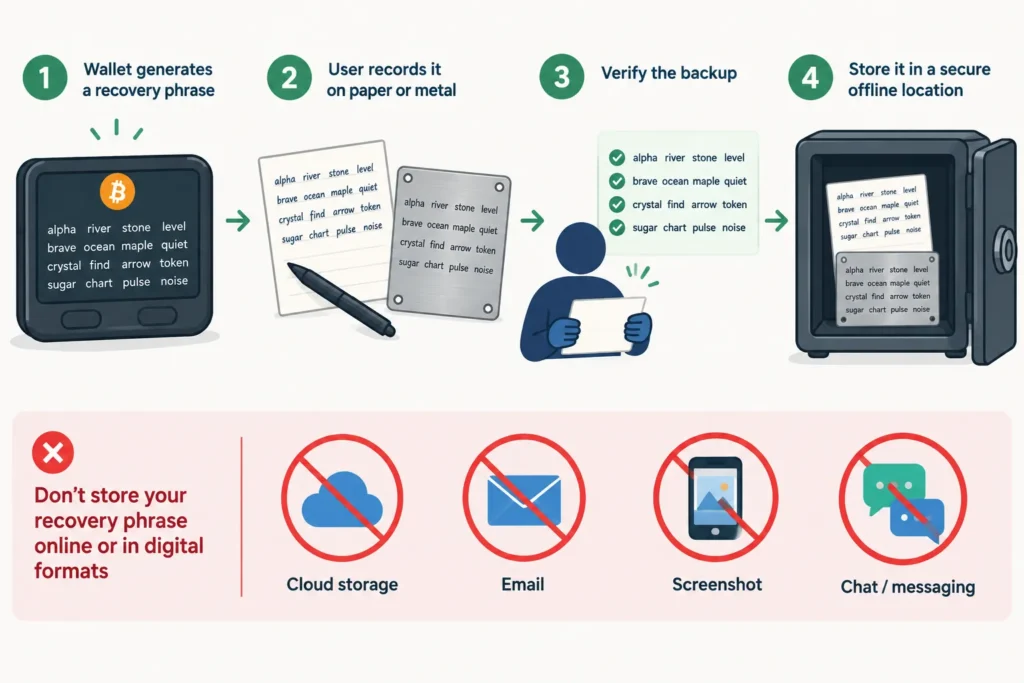
When you create a self-custody wallet, it will usually provide a recovery phrase, sometimes called a seed phrase. It commonly consists of 12 or 24 words. This phrase can restore the wallet and provide access to its Bitcoin.
Write the recovery phrase down accurately and keep it offline. Follow the wallet’s instructions about spelling and word order. After creating the backup, use the wallet’s built-in verification process if one is available.
Never store a recovery phrase in any of these places:
- A phone screenshot or photograph
- An email, draft or chat message
- A cloud drive or online notes application
- An ordinary computer document
- A password manager unless the wallet provider specifically recommends a secure method and you fully understand the risks
- A website sent through an advertisement, message or support conversation
A paper backup can be useful, but it may be damaged by water, fire or normal wear. Some users choose a durable metal backup for long-term storage. Whatever method you use, make sure the words remain readable and are stored in the correct order.
Consider keeping separate backup copies in secure locations. For example, keeping both copies in the same cupboard will not help if there is a fire or theft. However, every additional copy is another item that someone could discover, so avoid creating unnecessary copies.
Do not leave a recovery phrase in a bank locker or other location without considering who may gain access to it. The storage arrangement should also account for emergencies and inheritance, but it should not expose the phrase to family members, employees or service providers who do not need it.
Your private keys require the same level of protection. Never share a private key or recovery phrase with anyone. A legitimate wallet company, exchange support agent or genuine recovery service should not need these secrets to investigate a problem.
If someone obtains your recovery phrase, changing the wallet password is not enough. The attacker may restore the wallet elsewhere. In such a situation, you may need to create a completely new wallet and transfer the Bitcoin to it, provided you still control the funds and can do so safely.
Strengthen Exchange, Email and Other Accounts
If you use an exchange, protect the exchange account and the email account connected to it. An attacker who controls your email may be able to reset passwords, approve login attempts or impersonate you when contacting support.
Use a strong, unique password for every important account. Do not reuse your exchange password for email, banking, social media or shopping websites. A data leak from an unrelated service could otherwise expose your crypto account.
A reputable password manager can create and store long, unique passwords. Protect the password manager itself with a strong master password and the best multi-factor authentication option it supports.
Enable multi-factor authentication, or MFA, on:
- Your cryptocurrency exchange accounts
- Your primary email account
- Your password manager
- Cloud accounts connected to your phone or computer
- Any account that can approve withdrawals or reset passwords
Not all MFA methods provide the same protection. Text-message codes are better than using only a password, but criminals may attempt SIM-swap fraud or trick you into sharing the code. Authenticator apps and hardware security keys are generally more resistant to common account attacks. Security keys designed to verify the real website can also offer stronger protection against phishing.
Save account recovery codes offline in a secure place. Do not keep the only copy on the same phone used for authentication. Also review exchange settings such as withdrawal address allowlists, anti-phishing codes and login alerts, where available.
Keep Phones and Computers Safe
A secure wallet can still be exposed through an infected device. Keep your phone, computer, browser, wallet software and operating system updated. Updates often fix security weaknesses that attackers may exploit.
Download wallet and exchange apps only from sources identified by the official provider. Search advertisements and lookalike app listings can lead to fake software. Check the developer name, app details and official instructions instead of trusting the first search result.
Be particularly careful with wallet files received through messaging apps, email attachments, social media groups or unofficial download pages. Avoid pirated software, unknown browser extensions and tools that promise free Bitcoin, mining rewards or guaranteed profits. They may contain malware that records passwords, reads clipboard data or replaces a copied Bitcoin address.
Before buying a hardware wallet, check the manufacturer’s recommended purchasing channels. A used or tampered device may already be compromised. Be suspicious if the package contains a recovery phrase that has already been printed or written for you. A genuine hardware wallet should generate a new recovery phrase during setup, according to the manufacturer’s process.
Use a screen lock and device encryption where available. Do not conduct important Bitcoin transactions on shared computers or public devices. Public Wi-Fi can also create unnecessary risk, especially when you cannot confirm that the network is genuine.
Recognise Phishing and Fake Support
Phishing messages try to make you reveal information or approve a harmful action. They may claim that your exchange account is blocked, your wallet needs urgent verification, or a withdrawal is waiting for approval.
Common warning signs include:
- Pressure to act immediately or lose your funds
- Requests for a recovery phrase, private key, password or MFA code
- Unexpected links or attachments
- Slightly altered company names, email addresses or social media usernames
- Promises to recover stolen crypto after an advance payment
- Requests to transfer Bitcoin to a “safe”, “verification” or “upgrade” wallet
- Support agents who contact you privately without being asked
Scammers may impersonate an Indian exchange employee, police officer, tax official, investment adviser or well-known online personality. They may use logos, copied profile photographs and professional language. These details do not prove that the person is genuine.
If you receive an alarming message, do not use its link or phone number. Open the official app or type the known website address yourself, then contact support through the verified channel. Never allow an unknown person to control your screen through remote-access software.
Check the Entire Bitcoin Address
A Bitcoin address is a long string of characters, so users often compare only its first and last few characters. This is unsafe. In an address-poisoning scam, an attacker may send a small transaction or create a misleading address that resembles one you have used. The attacker hopes you will copy it from your transaction history.
Malware can also replace an address after you copy it. Always check the complete receiving address on the final confirmation screen. If you use a hardware wallet, compare the address shown on the hardware device with the address provided by the intended recipient.
Do not assume that an address is correct merely because it appears in recent transaction history. Obtain it directly from the recipient through an established communication channel. For an important payment, confirm the address using a second trusted channel, such as a known phone number.
Use a Pre-Transfer Safety Check
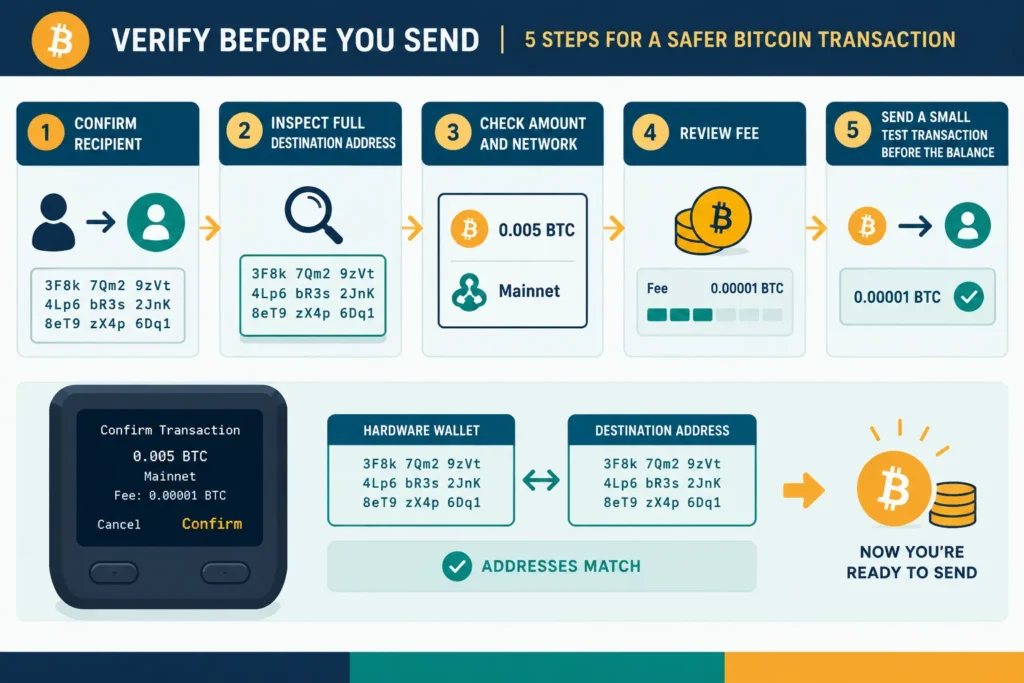
Pause before approving any Bitcoin transfer. A simple process can prevent many costly mistakes:
- Verify the recipient: Confirm who controls the destination wallet and why you are sending the payment.
- Confirm the full address: Compare every character, not only the beginning and end.
- Check the amount: Review both the Bitcoin amount and its approximate rupee value. Make sure decimal placement is correct.
- Confirm network compatibility: Check that both the sending and receiving services support the Bitcoin network or the specific transfer method being used. Do not select another network merely because its fee appears lower.
- Review the fee: Ensure that the network fee is reasonable for your needs and that the final amount is correct.
- Consider a test transaction: For a new address or a large transfer, send a small amount first. Wait for it to arrive and confirm control with the recipient before sending the balance.
A test transaction involves an additional network fee and may not suit every small payment. However, it can be useful when moving a significant amount from an Indian exchange to a personal wallet or when using a new withdrawal address for the first time.
Do not rush because someone claims an offer will expire in minutes. Take time to verify each detail independently. For broader context, continue with the cryptocurrency risks guide, the guide to choosing a Bitcoin wallet and the guide to evaluating cryptocurrency exchanges in India.
What to Do If Your Bitcoin May Be Compromised
If you notice an unknown login, withdrawal request, wallet transaction or security alert, stay calm. Acting quickly matters, but rushed decisions can create another problem.
Do not respond to direct messages offering “recovery services”. Scammers often contact victims and claim that they can retrieve stolen Bitcoin for an advance fee. There is usually no central authority that can reverse a confirmed Bitcoin transaction.
1. Stop Using the Affected Device
If you suspect malware, remote-access software or unauthorised control, stop using that phone or computer for financial activity. Disconnecting it from the internet may limit further access, but do not delete apps, reset the device or destroy possible evidence in a hurry.
Use a different, trusted device to secure your accounts. Ideally, this should be a device with updated software that you believe is free from malware.
2. Contact the Exchange or Custodian Safely
If your Bitcoin is held on an exchange or another custodial platform, contact its support team immediately. Open the official app yourself or type the known official website address directly. Do not use a link received through email, SMS, search advertisements or social media.
Ask the provider whether it can temporarily restrict withdrawals, close unknown sessions or review suspicious activity. The provider’s ability to help will depend on its systems and on whether the Bitcoin has already left the account.
Never give a recovery phrase, private key, one-time password or screen-sharing access to someone claiming to be support staff. Genuine support should not need your wallet recovery phrase.
3. Secure the Connected Email Account
Your email account may be the route used to reset an exchange password. From a trusted device, change the email password to a new and unique one. Review recovery email addresses, phone numbers, forwarding rules, app passwords and logged-in sessions.
Enable strong multi-factor authentication where available. An authenticator app or hardware security key may provide better protection than relying only on SMS, depending on the service and your circumstances.
4. Change Passwords and Review Sessions
Change the password of the affected exchange or custodial account from the trusted device. The new password should be long, unique and not reused on any other service.
Review active sessions, connected devices, application programming interface keys, withdrawal addresses and third-party permissions. Remove anything you do not recognise. If the same old password was used elsewhere, change it on those accounts too.
5. Move Funds Only When It Is Safe
If you still control the Bitcoin but believe the current wallet is unsafe, you may need to transfer the remaining funds to a newly secured wallet. Create the new wallet on a trusted device and obtain a completely new recovery phrase.
Verify the new receiving address carefully. Consider sending a small test amount first when fees and urgency make that practical. After confirming that it arrived, transfer the remaining balance.
Do not create the replacement wallet on the suspected device. Also avoid copying the new recovery phrase into cloud notes, email, messaging apps or screenshots.
Recovery Phrase Exposure and Loss
If the Recovery Phrase Has Been Exposed
A recovery phrase should be treated as compromised if another person has seen it, photographed it, received it in a message or gained access to an unencrypted digital copy. Changing a wallet password or app PIN does not make an exposed phrase safe.
Anyone with the phrase may be able to recreate the wallet elsewhere. If you still control the funds, prepare a new wallet with a new phrase on a trusted device and transfer the Bitcoin when it is safe to do so.
Do not keep using the old phrase for future deposits. A wallet that appears safe today could still be emptied later by someone who retained a copy.
If the Recovery Phrase Is Lost
If your wallet still opens and you can spend from it, you may still have an opportunity to protect access. Follow the wallet provider’s official instructions for checking backups or transferring the Bitcoin to a new wallet with a properly recorded phrase.
If the working device is lost, damaged or reset before you create a valid backup, recovery may be impossible. Bitcoin does not have a “forgot phrase” button, and no support team can recreate a self-custody private key.
Be cautious of people who guarantee recovery. Some legitimate technical specialists may assist in limited situations, such as certain damaged backups, but nobody can promise success. Never hand over sensitive information without understanding the risk.
Reporting Suspected Fraud in India
Preserve useful records, including transaction IDs, wallet addresses, exchange statements, emails, chat messages, payment receipts and screenshots. Record the timeline while the details are fresh.
Confirm current reporting procedures only through official Indian government, law-enforcement or regulated service-provider channels. Contact details and processes can change, so do not rely on numbers posted in social media replies, private groups or forwarded messages.
If an exchange, bank or payment service was involved, use its independently verified official support channel as well. A report may help an investigation or allow a provider to flag an account, but it does not guarantee that transferred Bitcoin will be returned.
Plan for Family Access Without Exposing the Phrase
A security plan should also consider illness, incapacity or death. If nobody knows that your Bitcoin exists or how to access it lawfully, the funds could become permanently inaccessible.
Create clear instructions explaining what assets exist, which wallet or custodian is used, where official documentation can be found and whom the family should contact for trusted help. Keep these instructions updated.
Do not casually write the complete recovery phrase in an ordinary will, email or shared family document. Such records may be viewed by more people than expected. Store backups securely and consider separating general instructions from the secret needed to spend the Bitcoin.
Choose trusted people carefully. They should understand that the information must remain private and that nobody should type the phrase into a website sent by another person. More complex arrangements may need appropriate legal and technical advice in India.
Beginner Checklist: How to Secure Bitcoin
- Decide whether self-custody or a reputable custodian better matches your knowledge and ability to manage backups.
- Download wallet software only from independently verified official sources.
- Keep wallet apps, operating systems and device security software updated.
- Use a strong, unique password for every exchange, email account and password manager.
- Enable suitable multi-factor authentication and securely store backup methods.
- Write down the recovery phrase accurately and keep it offline in a secure location.
- Never share the recovery phrase or private key with support staff, friends or online “helpers”.
- Do not store an unprotected phrase in screenshots, email, cloud notes or chat messages.
- Check the full receiving address and network before approving a transaction.
- Use a small test transaction when appropriate, especially for a new address or unfamiliar process.
- Treat urgent investment offers, guaranteed returns and recovery promises as warning signs.
- Open exchange and wallet services directly instead of following unexpected links.
- Review account sessions, withdrawal activity and security settings regularly.
- Maintain a secure family or inheritance plan and test that your backups are readable.
- Read established wallet-security and scam-prevention guidance, including the security guidance published by Bitcoin.org, while also following the official instructions for your specific wallet.
Frequently Asked Questions
Can Bitcoin Be Hacked?
The Bitcoin network itself is different from a wallet, exchange or user account. Theft more commonly happens through stolen recovery phrases, weak passwords, fake apps, phishing, malware, compromised exchanges or tricked users. Strong personal security reduces these risks, but no setup can remove every risk.
How Do I Protect a Bitcoin Wallet?
Use trusted wallet software, keep devices updated, protect access with a strong password, and store the recovery phrase offline. Verify addresses before sending and never enter the phrase into a website or form because someone asks you to “verify” the wallet.
Can I Share My Recovery Phrase with Support?
No. A legitimate support representative should not require your recovery phrase or private key. Anyone who has the phrase may be able to control the wallet and transfer its Bitcoin.
What Happens If Bitcoin Is Sent to the Wrong Address?
A confirmed Bitcoin transaction generally cannot be cancelled or reversed. If you know and trust the recipient, you can ask them to return it, but they may not do so. If the address belongs to a service, contact its verified official support with the transaction details. Recovery is not guaranteed.
What Should I Do If My Wallet Is Compromised?
Stop using the affected device, use a trusted device to secure connected accounts, and preserve evidence. If you still control the Bitcoin, create a new wallet with a new recovery phrase and move the funds when safe. If a custodian is involved, contact it through an independently verified official channel.
Summary
Learning how to secure Bitcoin is mainly about protecting devices, accounts, private keys and recovery phrases. If something appears compromised, act calmly: stop using the affected device, secure your email and accounts, contact the relevant provider safely, and move controlled funds to a newly secured wallet when necessary.
An exposed recovery phrase should be replaced, while a lost phrase can lead to permanent loss once the working wallet is no longer available. Keep reliable offline backups, verify every transaction, distrust unsolicited help and prepare a careful family access plan. Good security cannot guarantee recovery after theft, but it can prevent many common mistakes and scams.
Comments