

A crypto wallet is a tool that helps you access and use cryptocurrency recorded on a blockchain. It does not store coins in the same way that a physical wallet stores rupee notes. Instead, it manages cryptographic credentials—especially private keys—that allow you to receive crypto and authorise transactions. Your private key and seed phrase must always remain secret.
Introduction
If you are starting with cryptocurrency in India, the term “crypto wallet” can be confusing. It may sound like an ordinary wallet, a bank account or a digital payments app. However, it works differently from all three.
A physical wallet holds cash. A bank maintains a record of the money in your account. A UPI app helps you instruct a bank to transfer rupees. A cryptocurrency wallet, on the other hand, helps you interact with assets and transaction records maintained on a blockchain.
This difference matters because cryptocurrency transactions usually do not have the same reversal process or customer-support structure as bank and UPI transactions. If crypto is sent to the wrong address, or if someone obtains your private key, recovering the assets may be difficult or impossible.
Before choosing or using any crypto wallet, you should understand four basic terms: wallet address, public key, private key and seed phrase. These terms explain what a wallet actually controls and why wallet security is so important.
What a Crypto Wallet Is and How It Works
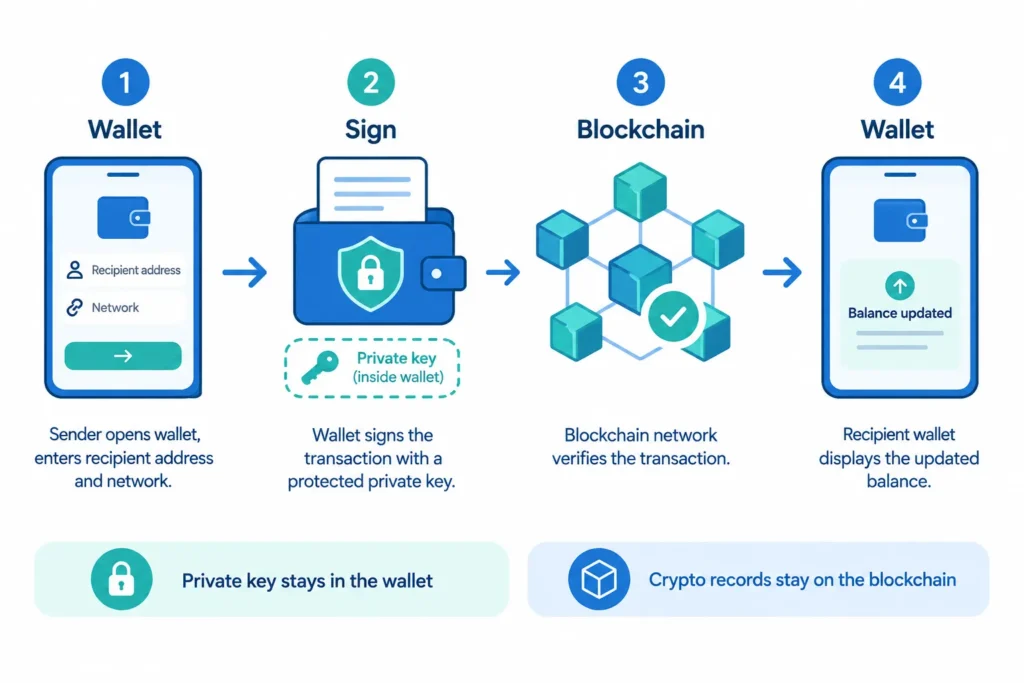
A crypto wallet is software or a physical device that manages the credentials needed to interact with a blockchain. Depending on the wallet, you may use it on a mobile phone, computer, web browser or dedicated hardware device.
The wallet can usually perform tasks such as:
- creating addresses that can receive cryptocurrency;
- showing balances and transaction history obtained from the blockchain;
- preparing transactions when you want to send crypto; and
- using a private key to approve, or digitally sign, those transactions.
The cryptocurrency itself does not move into your phone or device. Its ownership and transaction history remain recorded on the relevant blockchain. Your wallet provides the means to prove that you are authorised to use the crypto associated with particular blockchain addresses.
Think of the Blockchain as a Shared Record
A blockchain can be understood, in simplified terms, as a shared digital record of transactions. It records that cryptocurrency moved from one address to another and helps the network determine which transactions are valid.
Your wallet reads information from this record. When you open the wallet and see a balance, the wallet is not counting coins stored inside the app. It is checking blockchain data linked to your addresses and presenting that information in a convenient format.
When you send cryptocurrency, the wallet creates a transaction request. It then uses your private key to produce a digital signature. This signature proves that the transaction was authorised by the person controlling the relevant key, without revealing the private key itself to the blockchain network.
What Is a Wallet Address?
A wallet address is a string of letters and numbers used to receive cryptocurrency. It serves a practical purpose similar to sharing account details for receiving a bank transfer, although the technology and protections are different.
You can generally share a receiving address with someone who needs to send you crypto. Many wallets also display the address as a QR code so that the sender can scan it instead of typing a long string.
However, wallet addresses require care. Different blockchain networks can use different address formats. Sending an asset through an unsupported network or entering the wrong address may lead to permanent loss. Always check the full address, the cryptocurrency and the selected network before approving a transfer.
Also remember that a wallet address is not necessarily private information. Transactions involving an address may be visible on a public blockchain. The address may not directly display your name, but it should not be treated as providing complete anonymity.
What Is a Public Key?
A public key is cryptographic information connected to a private key. It helps the blockchain network verify digital signatures and confirm that a transaction was properly authorised.
A wallet address is generally created using information derived from a public key. The exact process varies across blockchain systems, so beginners do not need to calculate or manage this relationship manually. The wallet software normally handles it.
The important point is that public information can be used to receive crypto or verify activity, while the private key is used to authorise spending. Knowing a public key or wallet address should not allow someone to work backwards and discover the corresponding private key.
What Is a Private Key?
A private key is a secret cryptographic value that gives control over cryptocurrency associated with it. When your wallet signs a transaction, it uses the private key to show that you have authority to approve the transfer.
You can think of it as more powerful than a banking password or UPI PIN. A bank may be able to block an account, reset access or investigate some unauthorised transactions. In a self-managed crypto wallet, there may be no central institution capable of resetting a lost private key or cancelling a completed blockchain transfer.
You normally do not need to type the private key whenever you send crypto. The wallet manages it in the background after you unlock the app or device. Even so, anyone who obtains the private key may be able to control the associated assets.
Never share your private key. A genuine support agent, exchange employee, wallet provider or investment adviser should not need it. Do not send it through WhatsApp, email, SMS or social media. Do not enter it into an unknown website, form or app.
What Is a Seed or Recovery Phrase?
A seed phrase, also called a recovery phrase, is usually a sequence of words generated when a wallet is created. It can be used to restore access to the wallet and recreate its private keys on a compatible wallet application or device.
This makes the phrase useful if your phone is lost, your device stops working or you reinstall the wallet. It also makes the phrase extremely sensitive. Someone who gets the complete recovery phrase may be able to restore the wallet elsewhere and transfer the crypto without having your original phone.
A recovery phrase is not the same as an ordinary app password. Your password may only unlock the wallet installed on one device. The recovery phrase can provide wider control because it can recreate access to the wallet’s keys.
Follow these essential safety rules:
- Never share the seed phrase with another person.
- Never send a photograph or screenshot of it to anyone.
- Never enter it on a website reached through an unsolicited message or advertisement.
- Never provide it to someone claiming to be customer support, even if the message appears urgent.
- Do not store it casually in email, cloud notes or chat messages where another person or compromised account could expose it.
- Before entering it into any wallet, confirm that the wallet software and recovery process are genuine.
Scammers often claim that they need your phrase to “verify,” “upgrade,” “unblock” or “secure” a wallet. These claims are warning signs. A recovery phrase is for restoring your own wallet, not for proving your identity to a support representative.
A Simple Example for an Indian Beginner
Suppose Meera in Pune wants to receive a small amount of cryptocurrency from Arjun. Meera opens her crypto wallet, selects the correct asset and blockchain network, and copies the receiving address shown by the wallet.
She sends that address to Arjun. Before transferring, both of them check that the asset and network match. Arjun also compares the beginning and end of the address instead of assuming that a copied address is correct.
Arjun’s wallet prepares the transaction and uses his private key to sign it. The private key is not sent to Meera. Once the network accepts and records the transaction, Meera’s wallet reads the updated blockchain information and displays the received amount.
If Meera later sends the crypto to another address, her wallet uses her private key to authorise that new transaction. She does not hand over the key to the recipient. The digital signature provides the required proof of authorisation.
This example also shows why the visible balance is not stored inside Meera’s phone. If she loses the phone but has securely retained the correct recovery phrase, she may be able to restore the wallet on another compatible device. If she loses both the device and the recovery phrase, access may be permanently lost. If a scammer obtains the phrase, the scammer may gain control first.
The Core Idea to Remember
A crypto wallet manages access, not physical or digital coins stored inside it. The blockchain holds the transaction record, the wallet address helps receive crypto, and the private key authorises activity. A seed phrase can restore the private keys and must therefore receive the same level of secrecy.
Readers who need a broader explanation of blockchains, cryptocurrency transactions and the Indian context can refer to the pillar guide, Cryptocurrency in India: A Complete Beginner’s Guide to Crypto. The key lesson for wallet use remains simple: verify every transaction carefully, and never disclose your private key or recovery phrase to anyone.
Crypto Wallet Types and How Beginners Can Choose
A crypto wallet is a tool used to manage the digital keys that let you access and transact with cryptocurrency. It does not store coins in the same way that a physical wallet stores cash. The cryptocurrency remains recorded on its blockchain, while the wallet helps you control the keys needed to use it.
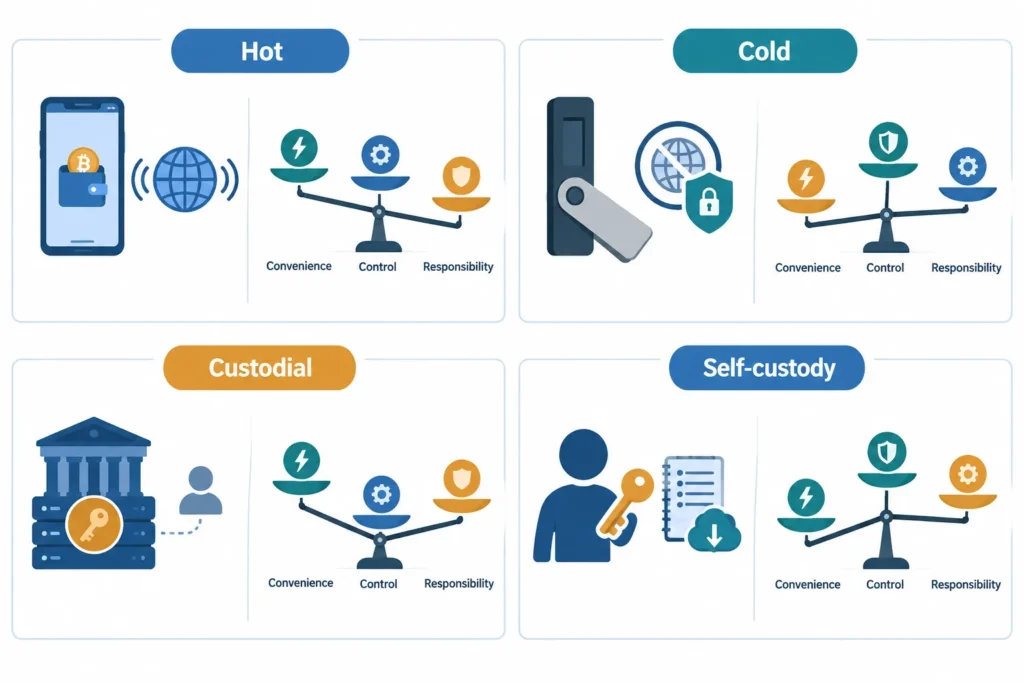
Wallets can be classified in several ways. The two most important comparisons are hot versus cold wallets, and custodial versus non-custodial wallets. Understanding both comparisons can help beginners choose a suitable setup.
Hot Wallets and Cold Wallets
A hot wallet is connected to the internet, either continuously or whenever you use it. Mobile wallets, desktop wallets and most exchange wallets fall into this category.
Hot wallets are generally convenient for regular transactions. For example, someone who buys crypto occasionally or transfers a small amount to another wallet may prefer quick access through a phone or computer.
However, internet connectivity creates additional exposure to phishing, malware, fake applications and account theft. Security depends not only on the wallet but also on the safety of your device, passwords and online behaviour.
A cold wallet keeps the private keys offline when they are not being used. Hardware wallets are the most familiar example. Some advanced users also create offline software-based setups, but these can be difficult for beginners to configure safely.
Cold wallets may suit people who plan to hold crypto for a long period and do not need frequent access. They reduce continuous internet exposure, but they are not automatically risk-free. A hardware device can be lost, damaged, tampered with or purchased from an unreliable seller. The owner can also lose access by mishandling the recovery phrase.
| Factor | Hot wallet | Cold wallet |
|---|---|---|
| Internet connection | Normally connected or used online | Keys remain offline when not in use |
| Convenience | Usually easier for frequent transactions | May require extra steps to access funds |
| Internet exposure | Higher exposure to online threats | Lower ongoing online exposure |
| Cost | Many software wallets are free to install | Hardware wallets require a purchase |
| Typical use | Active use and smaller operating balances | Long-term storage and less frequent access |
Some users combine both types. They may keep a smaller transaction amount in a hot wallet and store the remaining amount in cold storage. Whether this approach is appropriate depends on the amount held, the person’s experience and their ability to maintain backups securely.
Custodial and Non-Custodial Wallets
The question of custody is about who controls the private keys.
In a custodial wallet, a company or service generally controls the private keys on the user’s behalf. Crypto held in an account with a centralised exchange commonly works this way. You sign in using an email address, password and other authentication methods, while the exchange manages the underlying wallet infrastructure.
This arrangement can be easier for beginners. The service may provide familiar account-recovery processes if you forget your password. Buying, selling and trading may also be available within the same platform.
The trade-off is reduced direct control. Your ability to access or withdraw crypto depends on the service’s systems, security controls, operating status and rules. Withdrawals may be delayed or restricted in certain situations. A password reset can restore access to your exchange account, but it does not mean that you personally control the blockchain private keys.
A non-custodial wallet, also called a self-custody wallet, gives the user control of the private keys. It will usually provide a recovery phrase, sometimes called a seed phrase, during setup. This phrase can restore the wallet if the original phone, computer or hardware device is lost.
Self-custody offers more control, but it also transfers responsibility to the user. If the recovery phrase is lost and the device stops working, there may be no company capable of restoring access. If another person obtains the phrase, they may be able to control the wallet and transfer its crypto.
Never enter a recovery phrase into an unexpected website, message or support form. Genuine-looking calls, advertisements and social media accounts can still be scams. A recovery phrase should not be shared with friends, wallet support staff or exchange representatives.
Common Forms of Crypto Wallets
Wallet labels can overlap. For example, a mobile wallet is a software wallet and may be either custodial or non-custodial. A hardware wallet is normally a cold, non-custodial option.
Software and Mobile Wallets
A software wallet is an application installed on a phone or computer, or accessed through a browser extension. Mobile wallets are designed for smartphones and often make it easy to scan addresses or approve transactions.
The main advantage is convenience. Many software wallets can be installed without buying a separate device. They may be suitable for learning how wallet addresses, transaction fees and transfers work.
The disadvantages come from device and user risks. A stolen unlocked phone, malicious application, infected computer or fake browser extension can put funds at risk. Before installing a wallet, users should check the developer, download source, supported networks and requested permissions.
Hardware Wallets
A hardware wallet is a physical device designed to keep private keys separate from an internet-connected phone or computer. Transactions are prepared using an app and then approved through the hardware device.
Hardware wallets may reduce some online risks, but they cost money and require careful setup. Users must protect the device, PIN and recovery backup. They should also verify the authenticity of the device and seller rather than buying solely because an online listing is cheaper.
Hardware wallets can be less convenient for frequent transactions. Beginners should learn the correct recovery and address-verification process before transferring a substantial amount. A small test transfer can help confirm that the address and network are correct, although blockchain transaction fees may apply.
Exchange Wallets and Personal Wallets
An exchange wallet is the crypto balance shown inside an exchange account. It can be convenient for buying, selling and trading because funds are already on the platform. However, the exchange usually controls the private keys.
A personal wallet is one set up and controlled by the individual. In a non-custodial personal wallet, the user holds the recovery information and authorises transactions. This provides greater control but removes much of the support available through a custodial account.
Moving crypto from an exchange to a personal wallet is a blockchain withdrawal. The user must choose the correct asset, network and destination address. Sending to an incompatible network or incorrect address can cause permanent loss. A future guide on crypto exchanges can explain deposits, withdrawals and platform checks in greater detail, while a dedicated Bitcoin wallet guide can cover wallet choices specific to Bitcoin.
How to Choose a Crypto Wallet
There is no universal best crypto wallet. A useful choice depends on how you intend to use crypto and how much responsibility you can handle safely.
- Transaction frequency: A hot wallet may be more practical for regular transfers. Cold storage may be more suitable when access is infrequent.
- Amount held: Consider whether the value involved justifies the cost and additional process of a hardware wallet. Avoid keeping more in an easily accessible wallet than you are comfortable exposing to device or online risks.
- Technical comfort: Self-custody requires understanding addresses, networks, fees, backups and transaction confirmation. Custodial services may feel simpler, but they introduce dependence on the provider.
- Backup ability: Choose self-custody only if you can store recovery information safely and retrieve it when needed. Screenshots, email drafts and ordinary cloud storage can expose sensitive phrases.
- Device security: An updated, password-protected device is important for software wallets. Avoid installing wallet applications on shared or unreliable devices.
- Need for convenience: Decide whether quick trading access is more important than keeping keys under your direct control. Convenience and control often involve a trade-off.
Before choosing any wallet product, independently verify its current security design, supported cryptocurrencies, fees, recovery process, authenticity and availability in India. Features and service access can change. No wallet type can guarantee protection from scams, user mistakes, device failure or service-related risks.
Beginners should take time to understand recovery before depositing funds. A wallet is only as useful as the user’s ability to access it safely, protect its keys and send transactions correctly.
Wallet Setup, Backup, Security Mistakes and FAQs
Setting up a crypto wallet is not difficult, but the backup and security steps require patience. A rushed setup can lead to lost funds or exposure to scams.
The exact process depends on whether you choose an exchange wallet, mobile wallet, desktop wallet or hardware wallet. The following steps mainly apply to self-custody wallets, where you control the private keys or recovery phrase.
Basic Steps to Set Up a Crypto Wallet
- Choose the required wallet category. A mobile wallet may suit small, regular transactions, while a hardware wallet may be considered for longer-term storage. An exchange account is convenient for trading, but it does not provide the same control as a self-custody wallet.
- Verify the official source. Download wallet software only from the wallet provider’s official website or verified application-store listing. Check the developer name, spelling and reviews carefully. Fake applications may copy the name and appearance of a genuine wallet.
- Use a secure device. Install or initialise the wallet on a phone or computer that receives security updates. Avoid shared devices, public computers and devices with unknown or pirated software.
- Create a strong, unique password. Do not reuse a password from email, banking, social media or an exchange account. A password manager can help create and store unique passwords.
- Write down the recovery phrase offline. Many self-custody wallets provide a seed phrase or recovery phrase during setup. Copy every word accurately and preserve the exact order.
- Confirm the backup privately. Complete the wallet’s verification step without showing the phrase to another person. No genuine support representative needs these words.
- Test with a small transaction. Where appropriate, send a small amount first. Confirm that the wallet address, blockchain network and received amount are correct before transferring a larger amount.
A wallet password and a seed phrase serve different purposes. The password may lock the application or encrypt wallet information on a particular device. The seed phrase can usually restore control of the wallet on another compatible device.
Therefore, remembering the application password is not necessarily enough. If the device fails and the recovery phrase is unavailable, access to a self-custody wallet may be permanently lost.
How to Back Up a Recovery Phrase Safely
Treat a recovery phrase like the master key to the wallet. Anyone who obtains it may be able to control the crypto assets without knowing the application password.
- Write the words clearly, in the correct order, on a durable offline medium.
- Keep the backup private and away from phones, webcams and security cameras.
- Protect it from theft as well as fire, water and accidental disposal.
- Consider separate secure locations if you create more than one backup.
- Check occasionally that the backup remains readable and complete.
- Make sure a trusted succession plan exists if family members may need lawful access after your death.
Avoid storing recovery words in screenshots, photographs, email drafts, cloud notes, messaging applications or ordinary digital documents. These copies can be exposed if an account or device is compromised.
Do not enter a seed phrase into a website because a message claims that the wallet must be “verified”, “upgraded” or “synchronised”. Enter it only when deliberately restoring the wallet through trusted, compatible wallet software.
Crypto Wallet Security Checklist for Indian Users
- Keep the phone, computer, wallet application and browser updated.
- Use a strong device PIN, password, fingerprint or other screen lock.
- Enable two-factor authentication on exchange accounts, preferably through a suitable authenticator rather than relying only on SMS where alternatives are available.
- Secure the email account connected to an exchange with its own unique password and two-factor authentication.
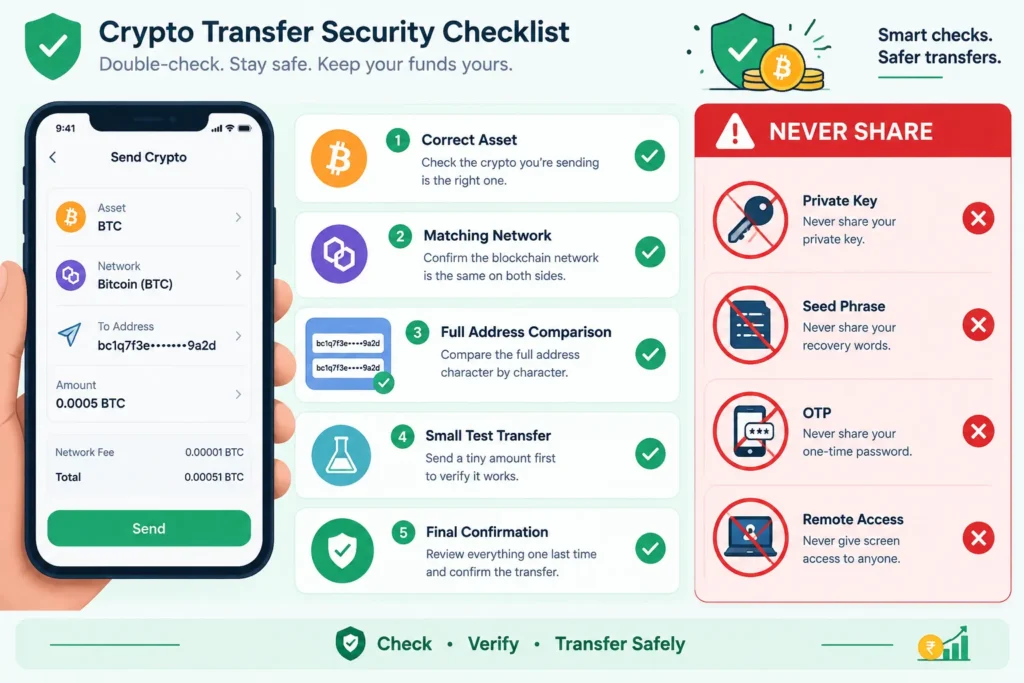
- Check the full receiving address before approving a transfer.
- Confirm that the selected blockchain network is supported by both the sending and receiving platforms.
- Make a small test transfer when sending to a new address or using an unfamiliar process.
- Use bookmarks or carefully typed addresses instead of links received through messages or advertisements.
- Contact support only through channels listed in the official application or website.
- Be cautious about unsolicited calls, Telegram messages, WhatsApp groups and social-media replies offering urgent help.
- Never share a private key, seed phrase, one-time password or remote screen access.
Crypto transfers are generally difficult or impossible to reverse after confirmation. A bank, exchange or wallet company may not be able to recover funds sent to the wrong address or network. Pause and verify every important detail before approving a transaction.
A future guide on cryptocurrency security will explain device protection, account security and safe transaction habits in more detail. Separate articles on crypto scams and exchange safety will cover common fraud patterns and platform-specific precautions.
Common Beginner Mistakes and Scams
Fake wallet applications: Fraudsters may publish applications that imitate popular wallets. Such an application may steal a recovery phrase or replace the receiving address. Verify the publisher and official source before installation.
Phishing pages: A fake login or wallet page may look genuine. It may arrive through a search advertisement, email or social-media message. Check the source carefully before entering credentials.
Malicious links and files: A link may install harmful software or open a false wallet page. Do not download files or browser extensions merely because a stranger claims they are required to receive funds.
Copied or altered addresses: Malware can replace a copied crypto address with an attacker’s address. Compare the beginning, middle and end of the address on the sending screen with the intended address. Do not check only the first few characters.
Fake customer support: Scammers may reply to public complaints and pretend to represent an exchange or wallet provider. Genuine support should never request a recovery phrase, private key, one-time password or transfer to a “safe wallet”.
Giveaway and investment claims: Promises to double crypto sent to an address are a common warning sign. Celebrity images, official-looking logos and screenshots do not prove that an offer is genuine.
Seed phrase requests: Anyone asking for the recovery words should be treated as a threat. A seed phrase is not required to receive crypto, confirm account ownership, claim an airdrop or obtain technical support.
What Happens If Access Details Are Lost?
The outcome depends on what was lost and who controls the wallet.
Lost wallet password: For some self-custody wallets, the wallet can be restored using the seed phrase and a new password can be created. Without the seed phrase or another valid backup, the password may not be recoverable.
Lost or damaged device: A self-custody wallet can often be restored on a compatible device if the recovery phrase is available. A new device should be obtained securely, and the old device should be remotely locked or erased where possible.
Lost private key or seed phrase: If the wallet remains accessible, create a new secure wallet and transfer the assets before access is lost. If the wallet is no longer accessible and no valid backup exists, the crypto may be permanently unreachable.
Lost exchange password: An exchange may offer account recovery after identity and security checks. This is different from self-custody because the exchange manages the underlying wallet access. Recovery is subject to the platform’s procedures and does not guarantee access in every situation.
Stolen seed phrase: Assume the wallet is compromised. If access remains available, move the assets promptly to a newly created wallet with a new recovery phrase. Do not continue using the exposed wallet.
Frequently Asked Questions
Are crypto wallets safe?
A crypto wallet can be used safely when it comes from a trusted source and is backed up and protected correctly. However, no wallet removes every risk. Device malware, phishing, weak passwords, exposed seed phrases and user errors can still cause losses.
Does a crypto wallet store cryptocurrency?
Not in the same way that a physical wallet stores cash. Cryptocurrency records remain on the blockchain. The wallet manages the keys and information needed to view balances and authorise transactions.
What is the difference between a hot wallet and a cold wallet?
A hot wallet is connected to the internet and is generally more convenient for regular use. A cold wallet keeps signing keys offline and can reduce online exposure, but it still requires careful setup, physical protection and secure backups.
Is keeping crypto on an exchange the same as self-custody?
No. With exchange storage, the platform generally controls the private keys and provides account access to the user. With self-custody, the user controls the keys or seed phrase and carries direct responsibility for security and recovery.
What happens if I lose my seed phrase?
If the wallet is still accessible, create a new wallet, back up its new seed phrase and transfer the assets. If access to the original wallet is also lost and no other valid backup exists, recovery may be impossible.
Summary
Choose a crypto wallet that matches how you plan to use and protect your assets. Install it from an official source, secure the device, use a unique password and keep the recovery phrase accurate, offline and private.
Remember that a password may protect the application, while the seed phrase may restore the wallet itself. Check addresses and networks carefully, use small test transfers where appropriate, and never disclose private keys or recovery words. In self-custody, control comes with full responsibility for backup, security and recovery.

Comments